Status
Not open for further replies.

Eisenheim

Passing Basics
Beginner
May 26, 2016
5
1
25
Awards
9
QNAP
TS-x51+
Ethernet
1 GbE
LV
1
 
Hi,

I download my torrents via RSS link by adding them and then they get transferred to rtorrent Pro. It used to download them as soon as they were added, but it is not doing this anymore. Is there an option I'm missing or is this maybe not supported any more?

I tried searching the forums for an answer, but I couldn't find anything... :/

Thanks in advance!

 
Solution
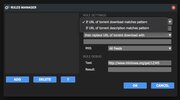
Click right mouse button and RSS manager.
Add new rule like this: /.+/
1678697559841.webp

And click "?" button to check if it works and catches your torrents in custom RSS feed.
Hi Silas,

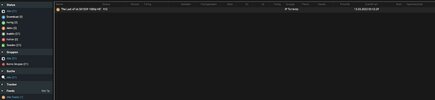
thanks for your reply! This is how it looks on rtorrent side. The File gets added to the queue, it just doesent start. I always have to click manually to start it. It looks to me as if the RSS works and is pointing to the .torrent file - what am I missing? :)
 

Attachments

  • Bildschirm­foto 2023-03-13 um 09.31.50.webp
    Bildschirm­foto 2023-03-13 um 09.31.50.webp
    25.8 KB · Views: 89
The File gets added to the queue, it just doesent start.
On your screen shot this is still not the queue. This is RSS feed.
Make sure you have created a rule to add torrent downloads automatically.

One more thing...
What is this RSS feed exactly? Is it some custom RSS feed? I mean, you go to the website where you have torrents list and on that site you have to click on torrent item and click something like: add to RSS / queue?

Or it is standard RSS feed containing all torrents from that tracker?
 
Yes, its the custom feed, where I bookmark a torrent on a site, then it gets added to the feed.

Where do I create a rule? The only setting I could find is right clicking on the RSS feed and then Rules Manager, but I can't find any setting for automatically starting downloads.
 

Attachments

  • Bildschirm­foto 2023-03-13 um 09.48.06.webp
    Bildschirm­foto 2023-03-13 um 09.48.06.webp
    28.7 KB · Views: 88
Click right mouse button and RSS manager.
Add new rule like this: /.+/
1678697559841.webp

And click "?" button to check if it works and catches your torrents in custom RSS feed.
 
Solution
Status
Not open for further replies.

Users search this thread by keywords

  1. rss feed
  2. rss manager
  3. rrs feed
  4. manager rss
  5. rtorrent