
upload/download less than 1.3 MiB/s with any configuration, ports are forwarded
- 5 Kwiecień 2008
- 10 190
- 4 701
- 405
- Odznaki
- 205
- QNAP
- TS-x77
- Ethernet
- 1 GbE
We are not checking why other peers wont download data from you or why you have very low download speed.
It maybe because of:
- port throttling by ISP
- firewall rules on the router
- ips/ids running if your router is ubiquiti
- sometimes port is too big - its not about your ISP, but maybe peer ISP is blocking highest ports
- contry policy reject
- ipfilter enabled
- currently there are no peers that want to download your data
- torrent tracker did not refresh your status - sometimes it tooks 1 hour
- other clients dont want to negotiate with your torrent client when you have set: * preffer encryption, but allow plaintext; they mostly require plaintext but its not safe
- dht port is already in use
There are many things.
I don't know why this happen to your, but for example:
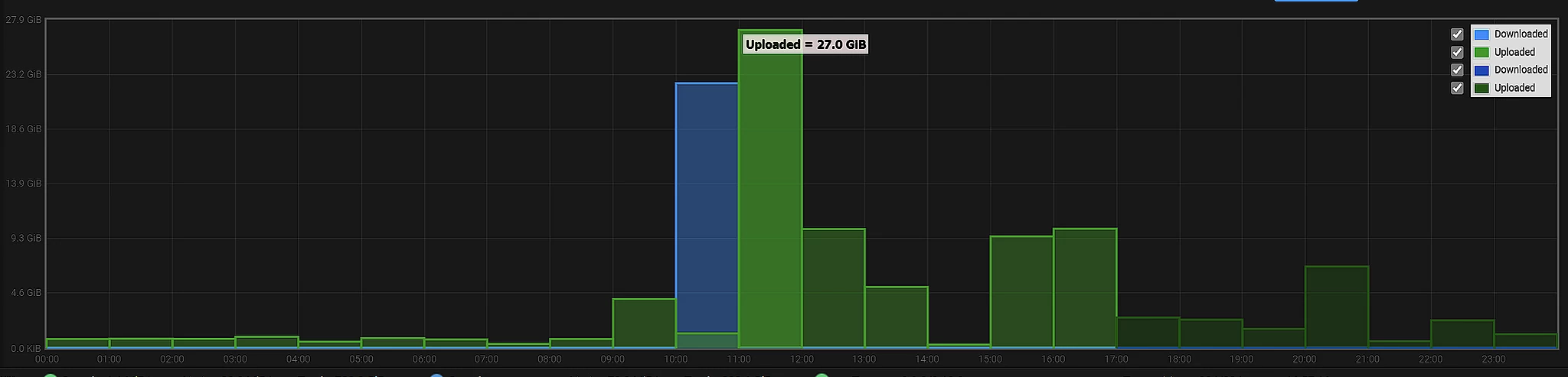
At 11 o'clock I only pushed 27GB od data.
I cannot help you.
It maybe because of:
- port throttling by ISP
- firewall rules on the router
- ips/ids running if your router is ubiquiti
- sometimes port is too big - its not about your ISP, but maybe peer ISP is blocking highest ports
- contry policy reject
- ipfilter enabled
- currently there are no peers that want to download your data
- torrent tracker did not refresh your status - sometimes it tooks 1 hour
- other clients dont want to negotiate with your torrent client when you have set: * preffer encryption, but allow plaintext; they mostly require plaintext but its not safe
- dht port is already in use
There are many things.
I don't know why this happen to your, but for example:
At 11 o'clock I only pushed 27GB od data.
I cannot help you.
Explanations for newbies do not apply to me.We are not checking why other peers wont download data from you or why you have very low download speed.
It maybe because of:
- port throttling by ISP
- firewall rules on the router
- ips/ids running if your router is ubiquiti
- sometimes port is too big - its not about your ISP, but maybe peer ISP is blocking highest ports
- contry policy reject
- ipfilter enabled
- currently there are no peers that want to download your data
- torrent tracker did not refresh your status - sometimes it tooks 1 hour
- other clients dont want to negotiate with your torrent client when you have set: * preffer encryption, but allow plaintext; they mostly require plaintext but its not safe
- dht port is already in use
There are many things.
I don't know why this happen to your, but for example:
![]()
At 11 o'clock I only pushed 27GB od data.
I cannot help you.
- port throttling by ISP never existed
- firewall rules on the router router doesn't have firewall
- ips/ids running if your router is ubiquiti this is not my router
- sometimes port is too big - its not about your ISP, but maybe peer ISP is blocking highest ports I am using is 18452 port forwarding is enabled
- contry policy reject I cannot possibly imagine download of debian image file to be rejected by ISP in US
- ipfilter enabled disabled
- currently there are no peers that want to download your data I experienced the same speed issue with download, multiple pairs are available for Debian image download
- torrent tracker did not refresh your status - sometimes it tooks 1 hour tracker refreshed and displayes timer within 30 min
- other clients dont want to negotiate with your torrent client when you have set: * preffer encryption, but allow plaintext; they mostly require plaintext but its not safe not the case
- dht port is already in use DHT is not the only protocol I am using
- traffic shipping remains the same throughout the time
Any other ideas like docker container setup issues, or multiple rTorrent plugins conflict, or something else?
Troubleshoot the issue on my computer, I will pay for that if it's not related to your software.
If you cannot provide technical support, refund the money then
- 5 Kwiecień 2008
- 10 190
- 4 701
- 405
- Odznaki
- 205
- QNAP
- TS-x77
- Ethernet
- 1 GbE
Of course because Im not responsible for that some peers wont get and download data from you.If you cannot provide technical support, refund the money then

But test scenario is simple:
1) run opentracker on your NAS
2) on a PC where iperf says between PC and your NAS you can reach 1gigabit link run torrent client and add to the trackers list your opentracker address
3) add the same torrent to rtorrent
I have nothing to add and I will close this thread if you dont wanna do this.
Witam i pozdrawiam kolegę z Ameryki., od Wujka Sama. Ja, Ice z Polski uważam, że problem jest po stronie sieci.
Pozdrawiam
Pozdrawiam
Jeżeli chcesz profi pomoc, od najlepszych ekspertów Qnap WW to musisz zainstalować, są tutoraiale na forum co i jak.
BTW, zajebiście znam angielski, jak native speaker, ale wypada pisać po Polsku jak jesteś na PL forum
Połączono posty:
BTW, zajebiście znam angielski, jak native speaker, ale wypada pisać po Polsku jak jesteś na PL forum
I guess I am giving up, upload speed remains at 1.2 MiB/s in total with different torrents as a group, asking for a refund.
Or can do chargeback if I get silent treatment, it's gonna cost seller extra €25 from stripe in addition to €16.
I have standard unmodified NAS setup this software that does not offer any trial and no money-back guarantee should be working perfectly upon install. But it does not. Tech support refused.
Or can do chargeback if I get silent treatment, it's gonna cost seller extra €25 from stripe in addition to €16.
I have standard unmodified NAS setup this software that does not offer any trial and no money-back guarantee should be working perfectly upon install. But it does not. Tech support refused.
- 9 Październik 2019
- 753
- 410
- 195
- Odznaki
- 123
- QNAP
- TS-x73A
- Ethernet
- 1 GbE
It works so there must be something with your setup environment.
As far I know there is no guarantee that it will work for everyone and inany every situation.
As far I know there is no guarantee that it will work for everyone and in
It works so there must be something with your setup.
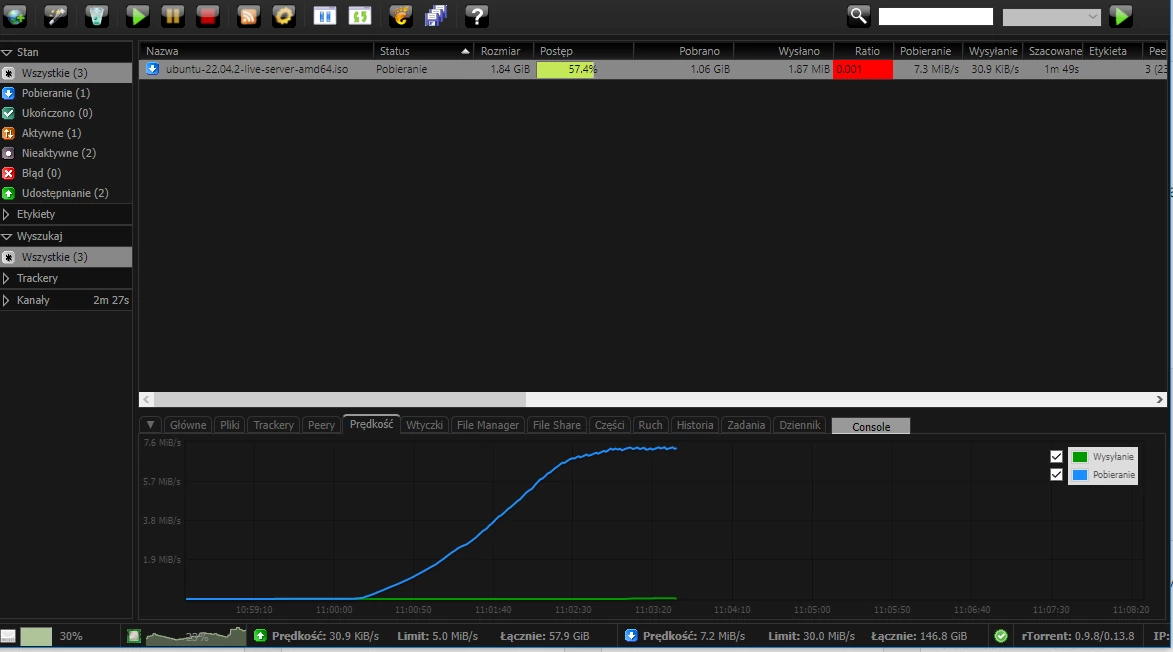
![]()
As far I know there is no guarantee that it will work for everyone and in any situation.
What setup, what in the world are you talking about?
I have not modified factory settings at all, so there is no "setup". The only "modifications" that had happened were done by the software installation.
About guarantee, since there is no free trial, that means there is a guarantee that it will work. Actually nothing mentioned explicitly or implicitly that it will work at all. But it does not mean that I cannot have my money back if it doesn't work. That's how credit card charges work.
- 9 Październik 2019
- 753
- 410
- 195
- Odznaki
- 123
- QNAP
- TS-x73A
- Ethernet
- 1 GbE
Podobne tematy
- Zamknięte
- Przypięty
Instrukcja obsługi
Getting Started with Rtorrent-Pro - Default Configuration and Managing
- Odpowiedzi
- 0
- Wyświetleń
- 8K
- Odpowiedzi
- 8
- Wyświetleń
- 3K
Instruktaż/Tutorial
ANBERNIC RG35XX STARTER GUIDE
- Odpowiedzi
- 0
- Wyświetleń
- 13K
- Odpowiedzi
- 0
- Wyświetleń
- 1K
- Odpowiedzi
- 0
- Wyświetleń
- 3K
Użytkownicy znaleźli tą stronę używając tych słów:
- *
- iperf
- POrt forwarding
- docker status
- Open VPN
- Entware-std
- rtorrent speed
- Entware
- RTorrent port
- openvpn
- qnapclub
- rtorrent Bandwidth