Podążaj za instrukcjami w poniższym filmie, aby zobaczyć, jak zainstalować naszą stronę jako aplikację internetową na ekranie głównym swojego urządzenia.
Informacja: Ta funkcja może nie być dostępna w niektórych przeglądarkach.
Używasz przestarzałej przeglądarki. Może ona nie wyświetlać poprawnie tej lub innych stron internetowych. Powinieneś zaktualizować swoją przeglądarkę lub użyć alternatywnej przeglądarki.
The port opens the admin panel:https://nas:9581/ and http://nas:9580/ open the admin panel's sign-in. A link made from the port alone, such as a dashboard tile, lands there, as App Center's Open button does. Webmail is at https://nas:9581/mail/.
Webmail addresses from before still work: bookmarks made in webmail and the Open webmail links of mailboxes go on to /mail/ by themselves. If someone types the port alone, the sign-in says "To read your messages, open webmail." and has an Open webmail button.
Minor
A WebPortico site that forwards to port 9581, such as webmail.example.com, still opens webmail at its root. Its redirects no longer add port 9581 to the address, which the internet cannot reach.
At each start MailServerPro writes the web ports of its settings into App Center. A port changed with mailctl set reaches App Center's Open button at the next start.
The domain API's answer names webmail's path, /mail/.
The admin panel fits a tablet. Up to 960 px wide, the long tables (Domains, Mailboxes, Aliases, Queue and others) show each row as a block, as on a phone. Up to 0.6.8, at 768 px the columns were squeezed and the row's buttons were cut off at the screen's right edge.
The admin panel on a phone: under 641 px wide, one bar at the foot of the screen holds Overview, Domains, Mailboxes, Queue and More (the other pages, the language, the theme and Sign out). The page scrolls as a whole, and the buttons are large enough for a finger.
Minor
The panel draws the same line icons as Rtorrent 16.
A field's description waits under a "?" beside its label; each panel keeps one line that says what it does.
On a phone, a table becomes one block per row, each value beside its column's name; small tables keep their columns.
Folders show as chips, and long names and addresses wrap between their parts.
Confirmations ask the way Windows does, for example "Are you sure you want to permanently delete the domain?"
Sizes are in KiB, MiB and GiB, and a mailbox's quota in MiB, as Dovecot reads it.
The Deliverability page names the lists that take no IPv6 address in one line under the table, instead of a row for each address.
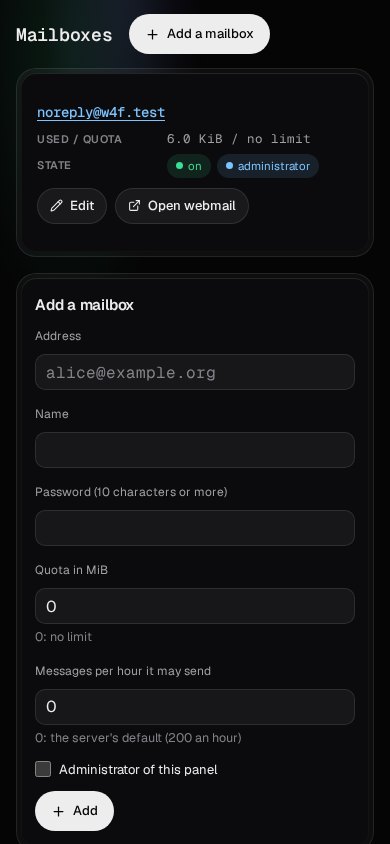
Open webmail from a mailbox: each active mailbox on the Mailboxes page, and the mailbox's own page, has an Open webmail button. It opens webmail in a new tab with the mailbox's address already filled in, so only its password is left to type.
Minor
The admin panel no longer shows an error page (HTTP 500, "unable to open database file") after a start in which Postfix opened the mail database first. Mail itself kept working.
The Deliverability page no longer asks you to register the NAS's address with Barracuda, which has closed its registration. Barracuda's list is still checked, with its links to look an address up and to ask for a removal.
A certificate from Let's Encrypt: choose Let's Encrypt as the Certificate on the Settings page, and MailServerPro asks for one certificate for its Host name and for mail.<domain> of each domain, so mail programs see a valid certificate for the name they connect to. Let's Encrypt checks each name through a TXT record that MailServerPro adds to the name's DNS zone and removes afterwards: through TurboDNS on the NAS, or through Cloudflare or OVHcloud with an API key you save once over SSH (/etc/init.d/MailServerPro.sh acme-key cloudflare, or ovh). MailServerPro renews the certificate by itself when 30 days are left; when renewing keeps failing, QTS shows a notification.
SURBL block list: the SURBL switch (until now "SURBL in the Deliverability check") also covers the spam filter for incoming mail. While it is off, the default, MailServerPro asks SURBL nothing; switched on, both the spam filter and the Deliverability check use SURBL.
Minor
Calls to Cloudflare and OVHcloud go over IPv4 first, so a key limited to your IPv4 address also works on a NAS with IPv6.
The certificate keeps the server's own key, so a published TLSA record stays valid.
A name whose DNS zone is somewhere else is left out of the certificate, and the Settings page says why.
SURBL switched off in the Deliverability check: SURBL's terms ask for an agreement with SURBL before a product uses its data, so MailServerPro no longer asks SURBL unless you switch it on (Settings, "SURBL in the Deliverability check"). Spamhaus DBL and URIBL are checked as before.
Minor
A SURBL result from 0.6.2 leaves the Deliverability page at the first check after the update, without a notification.
Deliverability page: every hour MailServerPro checks whether block lists list the public address your mail leaves from (Spamhaus ZEN, SpamCop, Barracuda, PSBL, UCEPROTECT level 1, Mailspike, s5h, 0spam) or your domains (Spamhaus DBL, SURBL, URIBL), and whether the domains' SPF, DKIM and DMARC records and the address's PTR record and HELO name fit together. Each listing links to the list's own page for removal, and a new listing, and its end, is also a QTS notification.
Minor
The lists are asked through the server's own resolver, and a list's answer counts only when it answered its own test questions right: a refusal (Spamhaus refuses large public resolvers) shows as a refusal, never as "not listed".
Settings: Public address for outgoing mail. Empty, the default, finds it: this NAS's own address when it is public, else the router's WAN address, and this NAS's own IPv6 address.
DNS block lists check themselves: every 10 minutes MailServerPro asks each DNS block list about the two test addresses every list publishes. A list that starts answering for every address would refuse all your incoming mail, so it is switched off by itself, the Settings page says so, and QTS's notifications tell you. It is switched back on once it answers correctly again. Your list of zones on the Settings page stays as you wrote it.
A HELO name of its own: the Settings page has a HELO name, the name the server gives other mail servers when it delivers mail. Receiving servers compare it with the PTR record of your public address, so you can set it to that record's name while the Host name keeps naming the certificate. Left empty, it is the Host name.
DNS block lists: list DNSBL zones on the Settings page, and mail from a server whose address one of them lists is refused. Mail servers at the addresses and networks you add as exempt are never refused by a list.
Mail import:mailctl import takes in a mail bundle: domains, mailboxes with their mail and passwords, aliases, forwards, autoresponders and DKIM keys. Messages keep their dates, and the inbox keeps its message numbers, so mail programs do not download it again. A second import adds only what is new.
Minor
The address type for outgoing mail on the Settings page: no preference, IPv4 first or IPv6 first. Choose IPv4 first when your IPv6 address has no PTR record.
mailctl dkim DOMAIN --import FILE makes a DKIM key from another server the domain's key, and the domain's DNS records show it.
Saving the Settings page keeps a largest message size that is not a whole number of MiB.