Podążaj za instrukcjami w poniższym filmie, aby zobaczyć, jak zainstalować naszą stronę jako aplikację internetową na ekranie głównym swojego urządzenia.
Informacja: Ta funkcja może nie być dostępna w niektórych przeglądarkach.
Używasz przestarzałej przeglądarki. Może ona nie wyświetlać poprawnie tej lub innych stron internetowych. Powinieneś zaktualizować swoją przeglądarkę lub użyć alternatywnej przeglądarki.
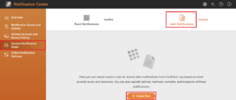
Open 'System Notification Rules' tab from the left bar.
Switch to 'Alert Notifications' on the top bar.
Finally hit 'Create rule button'.
Okay, once done:
as
Now it's a time to define what kind of security level alerts you want to receive.
Uncheck both Warning and Error messages, but click on Information messages instead and select Filter to Included only:
Enter filter: Download finished
Click Next button
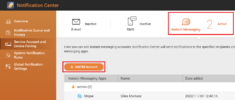
Choose the method you want to receive notifications. From dropdown list select Instand Messaging and select recipients.