RePortico shows the sites that WebPortico serves on your QNAP NAS, and the NAS's apps, as tiles on your phone. A tap opens a site or an app.
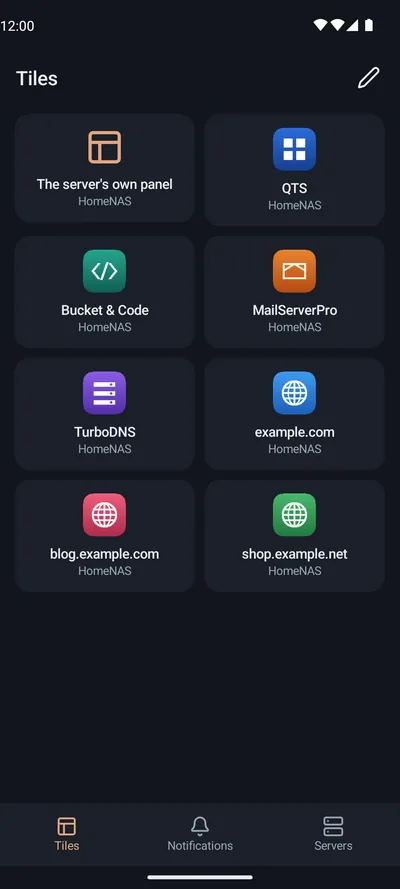
  • One grid holds the tiles of every WebPortico that you paired.
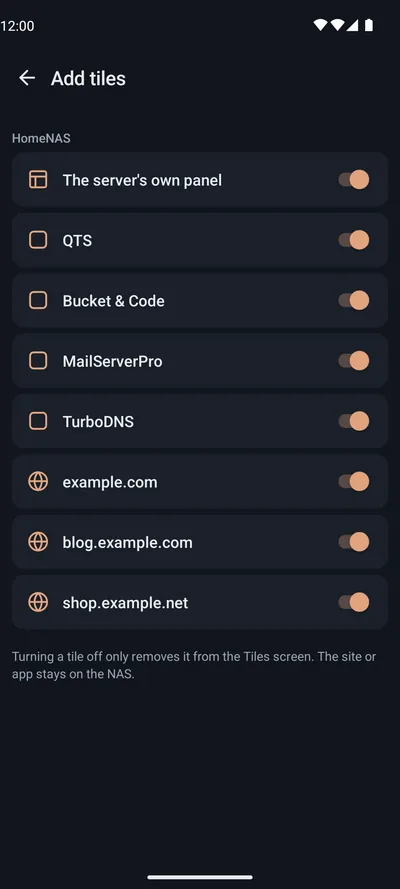
  • Edit lists each server's sites and apps, with a switch for each.
  • A tile opens through WebPortico's phone port, signed in for that tile only.
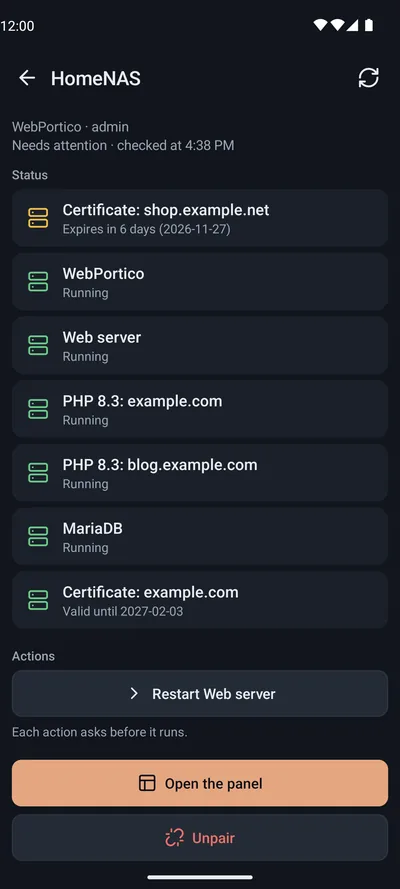
  • The Servers tab opens each server's status screen: errors first, then WebPortico's actions, each after a confirmation.
  • WebPortico's notices appear on the phone.

The tiles of a paired WebPortico
Edit, with a switch for each site and app
A server's status screen with one warning


Where to get it​

  • F-Droid: add our repository https://pub.qnaputilities.com/fdroid/repo, then search for RePortico. The fingerprint is on the app's page.
  • APK 1.0.0: the Download the APK button on the app's page.
The F-Droid version and the APK have the same signature, so each installs as an update of the other. The iPhone app is not in the App Store yet.

Pair it with your NAS​

  1. On a computer on your home network, open the WebPortico panel at its own address and go to Phone app › Pair a phone.
  2. Connect the phone to the same network. In the app, tap “Add server”, then “Scan the QR code”.
  3. Or type the address and the code from the page. Pair only if the app shows the same certificate fingerprint.
The code works once, for 10 minutes. Away from home: on the Phone app page, under “Remote access”, turn on “Allow connections from outside the home network”, then forward the TCP port that the page names on your router. That port answers only paired phones.

Requirements​

Android 8.0 or newer, and WebPortico with the Phone app page in its panel. Tiles need Android 10 or newer. On Android 8 and 9 the app shows the status screen and the panel on your home network only. The app's texts are in English and Polish.
Autor
Silas Mariusz
Pobrano
0
Wyświetleń
12
Pierwsze wydanie
Ostatnia aktualizacja
Ocena
0,00 gwiazdka(i) Ocen: 0

Więcej zasobów od Silas Mariusz

  • WebPortico
    WebPortico
    A web hosting stack with nginx, Apache, PHP 8.1 to 8.5 and databases.
  • StorageDiag Utilities (Silas Doctor Utilities)
    StorageDiag Utilities (Silas Doctor Utilities)
    An advanced, Linux-class diagnostic & recovery workbench — running right on your QNAP NAS.
  • Rtorrent 16
    Rtorrent 16
    From search to screen. Maximum performance & total control. Your QNAP. Your rules!
  • TurboX
    TurboX
    IRC on the NAS with irssi, BitchX, Eggdrop, UnrealIRCd and ZNC.
  • TurboStat
    TurboStat
    Console monitors (htop, btop, Glances, iftop and more) for SSH.