


- 5 Kwiecień 2008
- 10 446
- 2 644
- 405
- Odznaki
- 205
- QNAP
- TS-x77
- Ethernet
- 1 GbE
Poz.
6
Media studio in Rtorrent 16 uses a language model to translate a film's subtitles and reads them aloud as a voice-over. It works with your own API keys: OpenAI (translation, speech to captions, voices) and, if you want, ElevenLabs (voices, speech to captions). Below are two short scenes from English films with Polish subtitles and a Polish voice-over. In Poland this kind of voice-over is called a lektor: one voice reads the translation over the quieter original audio. This tutorial covers version 16.27-12L and later.
Examples
Crank: the film's English subtitles translated into Polish, voice-over by OpenAI (voice onyx).
Source: Crank (2006), Lakeshore Entertainment, Lions Gate Films. 16 s excerpt for this tutorial.
Casino Royale: this copy has Polish subtitles only, so the studio first turned the English speech into captions (ElevenLabs). It then translated them into Polish. An ElevenLabs voice reads them (voice Piotr).
Source: Casino Royale (2006), Eon Productions. 16 s excerpt for this tutorial.
Both clips come from files the studio saved with Save as MKV…. For the forum I converted them to MP4 and burned the Polish AI subtitles into the picture. I also mixed the 5.1 sound down to stereo, made it louder and put a DO NOT COPY mark in the corner. The voice-over plays in the centre channel of the film's English track, and the original plays 12 dB quieter.
The same scene in Italian and French
The panel made these the same way as the Polish ones. With Translate Captions… I turned the same English captions into Italian and French, then used Read Captions Aloud… with ElevenLabs voices from its Voice Library: MarcoTrox for Italian and Nicolas for French. For Casino Royale the source is the same ElevenLabs transcription. The Italian lines run longer, so the Italian clips last 17 s.
Crank in Italian
Source: Crank (2006), Lakeshore Entertainment, Lions Gate Films. 17 s excerpt for this tutorial.
Crank in French
Source: Crank (2006), Lakeshore Entertainment, Lions Gate Films. 16 s excerpt for this tutorial.
Casino Royale in Italian
Source: Casino Royale (2006), Eon Productions. 17 s excerpt for this tutorial.
Casino Royale in French
Source: Casino Royale (2006), Eon Productions. 16 s excerpt for this tutorial.
What you need
Step by step
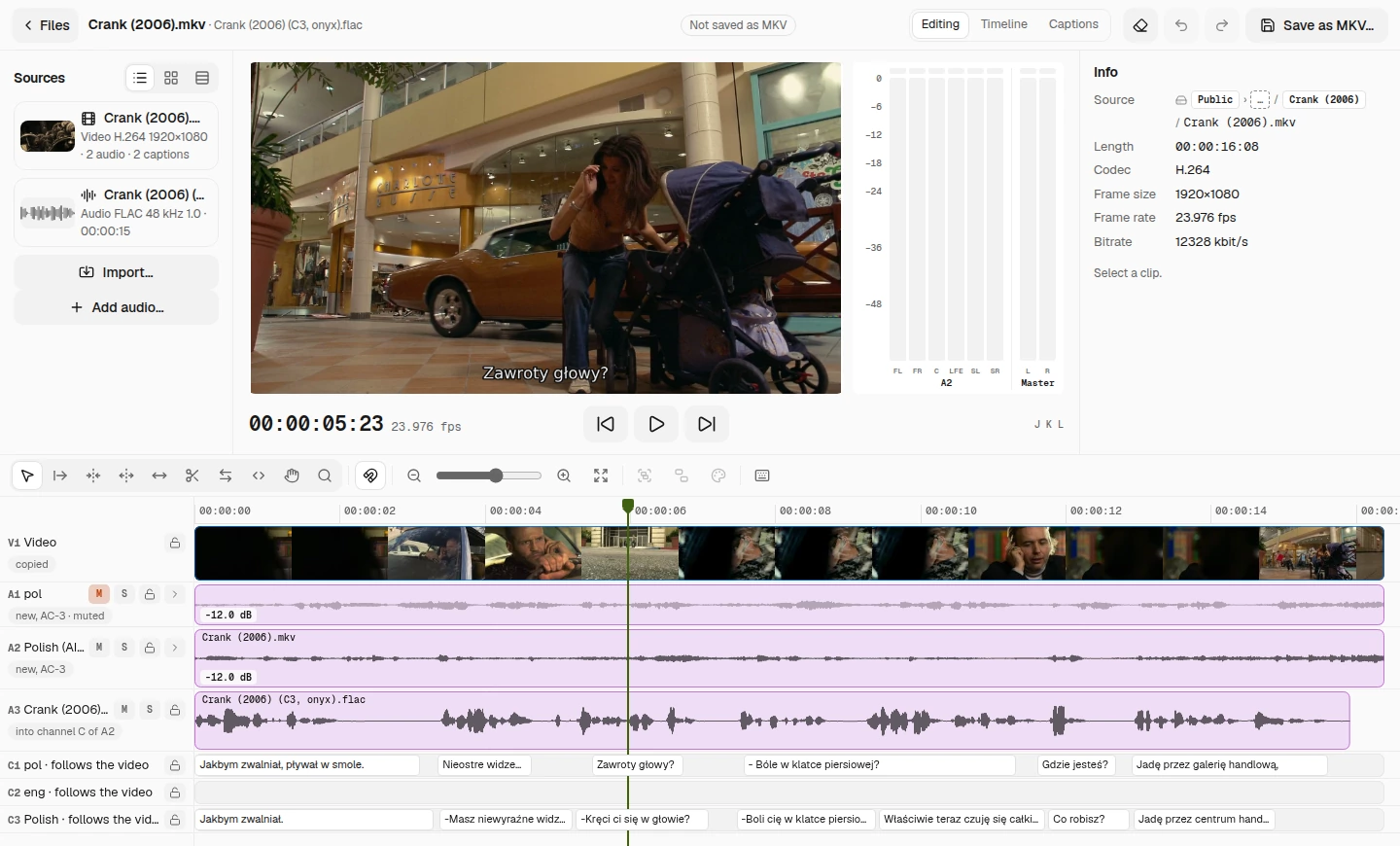
The whole Crank project after these steps:
Comparison: Crank
The model can word a line differently on each run. The tables show the lines in the clips.
Comparison: Casino Royale
The transcription treated the first line as a question, and the translation followed it. "Skarbiec" (a treasure vault) is the model's mistake; the film's subtitles say "Ministerstwo Finansów" (the ministry of finance). Read through an AI translation before you save. Double-click any caption in the studio to fix it.
Notice & Advise
Ref. links:
Rtorrent 16 guide: Media studio
Polska wersja: Rtorrent 16: tłumaczenie napisów przez AI i lektor AI w Studiu
Examples
Crank: the film's English subtitles translated into Polish, voice-over by OpenAI (voice onyx).
Source: Crank (2006), Lakeshore Entertainment, Lions Gate Films. 16 s excerpt for this tutorial.
Casino Royale: this copy has Polish subtitles only, so the studio first turned the English speech into captions (ElevenLabs). It then translated them into Polish. An ElevenLabs voice reads them (voice Piotr).
Source: Casino Royale (2006), Eon Productions. 16 s excerpt for this tutorial.
Both clips come from files the studio saved with Save as MKV…. For the forum I converted them to MP4 and burned the Polish AI subtitles into the picture. I also mixed the 5.1 sound down to stereo, made it louder and put a DO NOT COPY mark in the corner. The voice-over plays in the centre channel of the film's English track, and the original plays 12 dB quieter.
The same scene in Italian and French
The panel made these the same way as the Polish ones. With Translate Captions… I turned the same English captions into Italian and French, then used Read Captions Aloud… with ElevenLabs voices from its Voice Library: MarcoTrox for Italian and Nicolas for French. For Casino Royale the source is the same ElevenLabs transcription. The Italian lines run longer, so the Italian clips last 17 s.
Crank in Italian
Source: Crank (2006), Lakeshore Entertainment, Lions Gate Films. 17 s excerpt for this tutorial.
Crank in French
Source: Crank (2006), Lakeshore Entertainment, Lions Gate Films. 16 s excerpt for this tutorial.
Casino Royale in Italian
Source: Casino Royale (2006), Eon Productions. 17 s excerpt for this tutorial.
Casino Royale in French
Source: Casino Royale (2006), Eon Productions. 16 s excerpt for this tutorial.
What you need
- Rtorrent 16 16.27-12L or later.
- An OpenAI API key. Translate Captions always uses the OpenAI-compatible service.
- An ElevenLabs API key, if you want its voices or its speech to captions.
Step by step
- Keys. Open Settings › Files & storage › Speech service. Under OpenAI-compatible service, paste your key into API key, press Save, then Test. The panel shows The key works. Do the same under ElevenLabs and pick a Voice. With both keys saved, use Speech to text and Text to speech to choose which service does what. The panel never shows a saved key again.
- The film in the studio. In Files, right-click the film and choose Tools › Media studio…. The studio leaves the film on disk unchanged and saves your edits in a project file beside it.
- Only the scene. Put the playhead at the start of the scene and press Ctrl+K (Add Edit). Click the video clip before the cut and press Shift+Delete (Ripple Delete). Then put the playhead at the end of the scene, press Ctrl+K again, click the video clip after the cut and press Shift+Delete. A video cut lands on the nearest key frame. Transcribe to Captions… and Read Captions Aloud… send the service only what is left on the timeline. Translate Captions… sends the text of every caption in the track.
- Translation. Right-click the header of the English captions track and choose Translate Captions….
In Translate into, pick Polish. The Translation model is gpt-6-luna unless you change it. Press Translate. Only the caption text goes to OpenAI; the video and its audio stay on the NAS. Translating all 971 captions in Crank took 3 to 4 minutes.
A new Polish track appears under the English one, with the same timings. In the picture, C1 is the film's own Polish subtitles, C2 the English ones and C3 the AI translation.
- A film without English subtitles (Casino Royale). Right-click the clip on the English audio track and choose Transcribe to Captions…. Leave Language at English and press Transcribe. The studio adds a new captions track. Translate it as in step 4. For the transcription, I set Speech to text to ElevenLabs. It gives the time of each word, so a caption starts with its first word. It also ends a caption with its last word, so I dragged the right edge of each caption on the timeline to keep it on screen for at least 2 seconds.
- Listen before you record. Mute the film's Polish track with M on its header, so you hear only the original and the voice-over. In the header menu of the Polish captions track, turn on Preview Read Aloud and play the scene. The studio reads the captions as the film plays. While the voice speaks, every audio track plays 12 dB quieter. The audio meters show the speech as a separate bar (C3 here). The preview saves nothing.
- The voice-over as a track. In the same menu, choose Read Captions Aloud…, pick a Voice and press Read Aloud. The studio saves the speech in a FLAC file beside the project, such as Crank (2006) (C3, onyx).flac, and adds it as a new audio track. The voice reads each caption from the moment the caption starts. The studio does not speed up a longer Polish sentence, so the voice-over ends the scene about a second after the original.
- The voice-over in the film's track. Click the clip on the English track and, in the Info panel, type -12 into Audio Gain. You can also give the track a name (Polish (AI voice-over) here) and a language (pol) in this panel.
Open the English track's channels with the arrow on its header and click channel C. In the Channel A2 C window, under Audio, choose Mix with A3, the voice-over track. In the saved file, the original plays 12 dB quieter throughout the scene. The preview lowers it only while the voice speaks.
- Save. Press Save as MKV…. The window shows what goes into the new file: the muted track is unticked, and the voice-over track goes into channel C of A2. Tick the lines under Not kept or changed and press Save. The studio makes a new file beside the film, such as Crank (2006) (edit).mkv.
From 16.27-12L on, the window also saves captions tracks made by transcription, and their translations. For Casino Royale, Subtitles 2 is the English transcription and Subtitles 3 the Polish translation:
- Keys afterwards. If you do not want to keep the keys on the NAS, press Remove key for each service on the Speech service card.
The whole Crank project after these steps:
Comparison: Crank
The model can word a line differently on each run. The tables show the lines in the clips.
| English (the film's subtitles) | AI translation (gpt-6-luna) | The film's own Polish subtitles |
|---|---|---|
| It's like I'm slowing down. You know, I'm caught in a tar pit. | Jakby wszystko zwalniało. Wiesz, jakbym ugrzązł w smole. | Jakbym zwalniał, pływał w smole. |
| -Blurred vision? -Yeah. | -Masz zamazany obraz? -Tak. | Nieostre widzenie? |
| -Dizzy? -Sure. | -Kręci ci się w głowie? -Jasne. | Zawroty głowy? |
| -Any pain in your chest? -Not really. | -Boli cię w klatce piersiowej? -Nie bardzo. | - Bóle w klatce piersiowej? - Raczej nie. Czuję się dość dobrze. |
| Actually, I'm feeling pretty good right now. | Właściwie teraz czuję się całkiem dobrze. | (together with the line above) |
| What are you doing? | Co robisz? | Gdzie jesteś? |
| Driving through a mall. Cops chasing me. | Jadę przez centrum handlowe. Gonią mnie gliniarze. | Jadę przez galerię handlową, uciekam glinom. |
Comparison: Casino Royale
| English (ElevenLabs transcription) | AI translation (gpt-6-luna) | The film's own Polish subtitles |
|---|---|---|
| I'm the money? | To ja wykładam pieniądze? | Ja to pieniądze. |
| Every penny of it. | Co do grosza. | Każdą częścią. |
| The treasury has agreed to stake you in the game | Skarbiec zgodził się postawić na ciebie w tej grze. | Ministerstwo Finansów zgodziło się wystawić cię do gry. |
Notice & Advise
- For translation and reading captions aloud, only the caption text leaves the NAS. For speech to captions, the clip's audio leaves the NAS. The video never leaves the NAS.
- A simpler way, without an API key and in a few clicks, is on the way.
Ref. links:
Rtorrent 16 guide: Media studio
Polska wersja: Rtorrent 16: tłumaczenie napisów przez AI i lektor AI w Studiu
