- 5 Kwiecień 2008
- 10 190
- 4 701
- 405
- Odznaki
- 205
- QNAP
- TS-x77
- Ethernet
- 1 GbE
Yes,
Before I could download without problems the torrents of a web, but since I installed the new version I can not download them anymore.
- 5 Kwiecień 2008
- 10 190
- 4 701
- 405
- Odznaki
- 205
- QNAP
- TS-x77
- Ethernet
- 1 GbE
- 5 Kwiecień 2008
- 10 190
- 4 701
- 405
- Odznaki
- 205
- QNAP
- TS-x77
- Ethernet
- 1 GbE
No error appears, simply the file is not downloaded.
I had to download it with the Download Station program.
Before the new update was downloaded without problems, so the problem must be in the latest version.
I just need the previous version to install it. Can you tell me where to get it?
Thank you.
I had to download it with the Download Station program.
Before the new update was downloaded without problems, so the problem must be in the latest version.
I just need the previous version to install it. Can you tell me where to get it?
Thank you.
- 5 Kwiecień 2008
- 10 190
- 4 701
- 405
- Odznaki
- 205
- QNAP
- TS-x77
- Ethernet
- 1 GbE
All versions are available in qnapclub.eu.
But this will not help you at all. Build 0419 has a bug and until issue is found you cant expect any working version in a future.
Thanks for the info.
I have installed the previous version (0.9.6-0419) and I have been able to download the torrent, so it is clear that the new version does not allow downloading it.
I do not know if it's a bug, but with version 0.9.6-0419 I can download from that tracker.
Greetings.
I have installed the previous version (0.9.6-0419) and I have been able to download the torrent, so it is clear that the new version does not allow downloading it.
I do not know if it's a bug, but with version 0.9.6-0419 I can download from that tracker.
Greetings.
- 5 Kwiecień 2008
- 10 190
- 4 701
- 405
- Odznaki
- 205
- QNAP
- TS-x77
- Ethernet
- 1 GbE
Can't provide you any help if it's difficult for you to find out the issue. The only thing I asked is to know the tracker status response from torrent info tab.
I am having the same (or very similar) problem with this version. I'm old rtorrent user, but new on rtorrent pro.(bought last week)
I have a scenario with some peculiarities:
QNAP TS-469L - 4.3.4.0899 using Trunk(bonding round robin) on eth interfaces.
Mikrotik router
2 WAN's (qnap is going out by both wan's)
1- 50 Mbps DOWN - 30 UP (Public)
2- 5 Mbps DOWN - 1 UP (CGNAT)
Rtorrent - 0.9.7 - 0430
Rtorrent runs Ok, but at some time it "stuck", torrents shows "seeding" or "downloading" but nothing happens. Initially i had stopped rtorrent, restarted, rebooted qnap... it back alive, but later, "stuck" again..
Later, i noted rtorrent are not crashing/stuck... it simple stop sending or downloading, something related to it network stack.
When i disable my 2nd WAN which have a CGNAT IP, rtorrent back to life. Til then, others torrent apps on qnap or my windows runs very much fine using both wan's simultaneously which fully consumes my both UPLINKS
My next experiment was disabling QNAP trunk and Mikrotik router bonding configurations.
Til now, rtorrent is working very well downloading and seeding on both WAN's. If i disable wan1 or wan2, rtorrent keep seeding through the enabled wan interface, but when i re-enable, something is not good. Looks like rtorrent get lost.
Its early to tell that rtorrent with QNAP Network Trunk is the bad guy on this story and not working good with bond interfaces... but i will keep tracking.
I have a scenario with some peculiarities:
QNAP TS-469L - 4.3.4.0899 using Trunk(bonding round robin) on eth interfaces.
Mikrotik router
2 WAN's (qnap is going out by both wan's)
1- 50 Mbps DOWN - 30 UP (Public)
2- 5 Mbps DOWN - 1 UP (CGNAT)
Rtorrent - 0.9.7 - 0430
Rtorrent runs Ok, but at some time it "stuck", torrents shows "seeding" or "downloading" but nothing happens. Initially i had stopped rtorrent, restarted, rebooted qnap... it back alive, but later, "stuck" again..
Later, i noted rtorrent are not crashing/stuck... it simple stop sending or downloading, something related to it network stack.
When i disable my 2nd WAN which have a CGNAT IP, rtorrent back to life. Til then, others torrent apps on qnap or my windows runs very much fine using both wan's simultaneously which fully consumes my both UPLINKS
My next experiment was disabling QNAP trunk and Mikrotik router bonding configurations.
Til now, rtorrent is working very well downloading and seeding on both WAN's. If i disable wan1 or wan2, rtorrent keep seeding through the enabled wan interface, but when i re-enable, something is not good. Looks like rtorrent get lost.
Its early to tell that rtorrent with QNAP Network Trunk is the bad guy on this story and not working good with bond interfaces... but i will keep tracking.
- 5 Kwiecień 2008
- 10 190
- 4 701
- 405
- Odznaki
- 205
- QNAP
- TS-x77
- Ethernet
- 1 GbE
Tell me something.... Is that mean you have enabled port trunk on two absolutely different ISP? And you want to utilize both links same time?
Hi Silas,
I have 2 Wans, different ISPs. Mikrotik router is balancing the WAN's. Mikrotik do this job by marking connections from source ip, then marking routing from marked connections.
Is for home use and only qnap is using this balance. Mikrotik is set to force all others devices to going out only through the wan1. When wan1 is down, automatically everyone goes through the wan2.
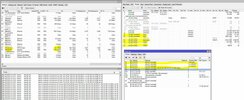
*2wan's traffic working on full upllink screenshot attached.*
If you need more details, I'll be happy to help.
Thank you.
Załączniki
- 5 Kwiecień 2008
- 10 190
- 4 701
- 405
- Odznaki
- 205
- QNAP
- TS-x77
- Ethernet
- 1 GbE
Yes, it's a trunk and qnap is using both ISPs.So this mean QNAP is using both ISP right?
I dont know how exactly Mikrotik choose the route, but it does a calculation with source ip, source port, destination ip and destination port.
- 5 Kwiecień 2008
- 10 190
- 4 701
- 405
- Odznaki
- 205
- QNAP
- TS-x77
- Ethernet
- 1 GbE
Can you show me how you have configured this trunk?I dont know how exactly Mikrotik choose the route, but it does a calculation with source ip, source port, destination ip and destination port.
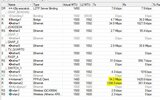
Can you show me how you have configured this trunk?![]()
Sure, no problem.
PS: Til now, rtorrent without trunk on qnap working nice on both WANs.
There's a general screenshot and the load balance rules below:
/ip firewall mangle
THIS RULE IS USED ONLY FOR CLOUDLINK/DDNS, THEN ADAPTED FOR 2710 PORT RARBG TORRENT TRACKER, BUT IS MISCONFIGURATED, BECAUSE RARBG HIGH PORTS IS UDP.
add action=mark-routing chain=prerouting comment="regra para qnap cloud sair pela timlive" dst-port=80,443,2710 new-routing-mark=decoders passthrough=no protocol=tcp src-address-list=QNAP
THESE RULES BASICALLY MARK THE INBOUND CONNECTIONS. SO ROUTER CAN RETURN PACKETS TO THE SAME INTERFACE
add chain=prerouting in-interface=internet1
add chain=prerouting in-interface=internet2
add action=mark-connection chain=input in-interface=internet1 new-connection-mark=internet1_conn
add action=mark-connection chain=input in-interface=internet2 new-connection-mark=internet2_conn
THIS RULE FORCES ALMOST ALL MY DEVICES TO GO TO WAN1
add action=mark-routing chain=prerouting new-routing-mark=decoders passthrough=no src-address-list=RECEPTORES
THESE RULES MARK ROUTES TO MARKED CONNECTIONS TO THE CORRECT OUT-INTERFACE
add action=mark-routing chain=output connection-mark=internet1_conn new-routing-mark=to_internet1
add action=mark-routing chain=output connection-mark=internet2_conn new-routing-mark=to_internet2
ROUTES
/ip route
add distance=1 gateway=internet1 routing-mark=decoders
add distance=1 gateway=internet2 routing-mark=to_internet2
add distance=1 gateway=internet1 routing-mark=to_internet1
add check-gateway=arp distance=1 gateway="internet1,100.76.192.1@(unknown)"
Załączniki
- 5 Kwiecień 2008
- 10 190
- 4 701
- 405
- Odznaki
- 205
- QNAP
- TS-x77
- Ethernet
- 1 GbE
without trunk you mean without the setting bellow?PS: Til now, rtorrent without trunk on qnap working nice on both WANs.
nope, its not similarI am having the same (or very similar) problem with this version. I'm old rtorrent user, but new on rtorrent pro.(bought last week)
sometimes its not good idea to say the true and keep quiet, but this time both of you guys are wasting my time
thread author which I tried to help has ignored me and I guess his issue was torrent client reporting too higer rtorrent version which was not allowed by a tracker
and Im not going to release 0.9.6 build so he will stuck with this issue w/o help...
and your issue is not similar... its different!
be honest...I'm old rtorrent user, but new on rtorrent pro.(bought last week)
rtorrent is not much different from rtorrent-pro
mikrotik is not for you
you do not understand what exactly is port trunking or load balancing and you do not have idea what are you doing while setting mikrotik
there is no way to agregate many ISP WAN into just one WAN and use them all without no clue in just one LAN... its not working like that....
you have to choose what kind of traffic goes out by one selected ISP and what will goes out using other one from different ISP. Torrent protocol also was not designed to handle both different ISP at same time even if that's not so difficult to do that, but for security reasons this is not good idea. Think when you report to your tracker your client IP lets say 1.1.1.1 you can NOT just like that ask your random peer to send the data to different, other IP let's say 234.0.0.1. who knows that this user does not belong to FBI?
But, yes of course that kind of data exchange will be supported in rtorrent 0.9.7 but not yet now! this kind of data exchange was introduced long time agao, much time before torrenting and exactly on fxp sites (on ftp with allowed trading from remote ftp to another remote ftp) but it was long time ago. Today rtorrent-Pro is going to have support for multiple interfaces too, but it cannot be merged by a router because it cannot be done the way you looking for.
No, rtorrent works good WITHOUT QNAP TRUNK (screen attached)PS: Til now, rtorrent without trunk on qnap working nice on both WANs.
without trunk you mean without the setting bellow?
*my 2 WANs is not a trunk. The WANs interfaces are in a load balance configuration.
nope, its not similarI am having the same (or very similar) problem with this version. I'm old rtorrent user, but new on rtorrent pro.(bought last week)
i understand and agree, time is money. But i really paid to support your software and development.sometimes its not good idea to say the true and keep quiet, but this time both of you guys are wasting my time
I am not here to bother you. I am just reporting a bug or whatever name we could give to the issue.
It's not a mikrotik configuration nor qnap trunk. Others torrent apps on qnap works good at the same scenario (load balance on mikrotik and bonding rr on qnap).
So i found an palliative solution by disabling qnap trunk.
Agree, no information was provided.thread author which I tried to help has ignored me and I guess his issue was torrent client reporting too higer rtorrent version which was not allowed by a tracker
and Im not going to release 0.9.6 build so he will stuck with this issue w/o help...
I have to disagree in part. It could be different, but the symptom looks to be the same.and your issue is not similar... its different!
be honest...I'm old rtorrent user, but new on rtorrent pro.(bought last week)
rtorrent is not much different from rtorrent-pro
mikrotik is not for you
you do not understand what exactly is port trunking or load balancing and you do not have idea what are you doing while setting mikrotik
there is no way to agregate many ISP WAN into just one WAN and use them all without no clue in just one LAN... its not working like that....
you have to choose what kind of traffic goes out by one selected ISP and what will goes out using other one from different ISP. Torrent protocol also was not designed to handle both different ISP at same time even if that's not so difficult to do that, but for security reasons this is not good idea. Think when you report to your tracker your client IP lets say 1.1.1.1 you can NOT just like that ask your random peer to send the data to different, other IP let's say 234.0.0.1. who knows that this user does not belong to FBI?
But, yes of course that kind of data exchange will be supported in rtorrent 0.9.7 but not yet now! this kind of data exchange was introduced long time agao, much time before torrenting and exactly on fxp sites (on ftp with allowed trading from remote ftp to another remote ftp) but it was long time ago. Today rtorrent-Pro is going to have support for multiple interfaces too, but it cannot be merged by a router because it cannot be done the way you looking for.
Podobne tematy
- Pytanie
- Odpowiedzi
- 2
- Wyświetleń
- 877
- Odpowiedzi
- 1
- Wyświetleń
- 700
- Odpowiedzi
- 0
- Wyświetleń
- 872
- Odpowiedzi
- 3
- Wyświetleń
- 1K
- Zamknięte
- Pytanie
Download
Rtorrent [x86_64] [Deleted]
- Odpowiedzi
- 8
- Wyświetleń
- 3K
Użytkownicy znaleźli tą stronę używając tych słów:
- torrent lost
- rtorrent-pro stuck downloading
- cgnat