
kennymc

Passing Basics
Beginner
16 Październik 2015
9
5
25
Odznaki
10
QNAP
TVS-x73
Ethernet
1 GbE
Poz.
1
 
I can't reply on rTorrent Pro so I'll try here
I just updated to Rtorrent 16 0.16.0-000 (removed Rtorrent 15 and did a clean install)
but I keep getting errors: The disk is full:
Screenshot_20250909_153421.webp

But when I check nothing is full, which disk is it talking about?
Screenshot_20250909_153512.webp
 
> What was the reason to uninstall previous one?
Because I got this error and thought doing a clean install might fix it

Do you use Rdownload share to store your download?

Please provide screen from this:
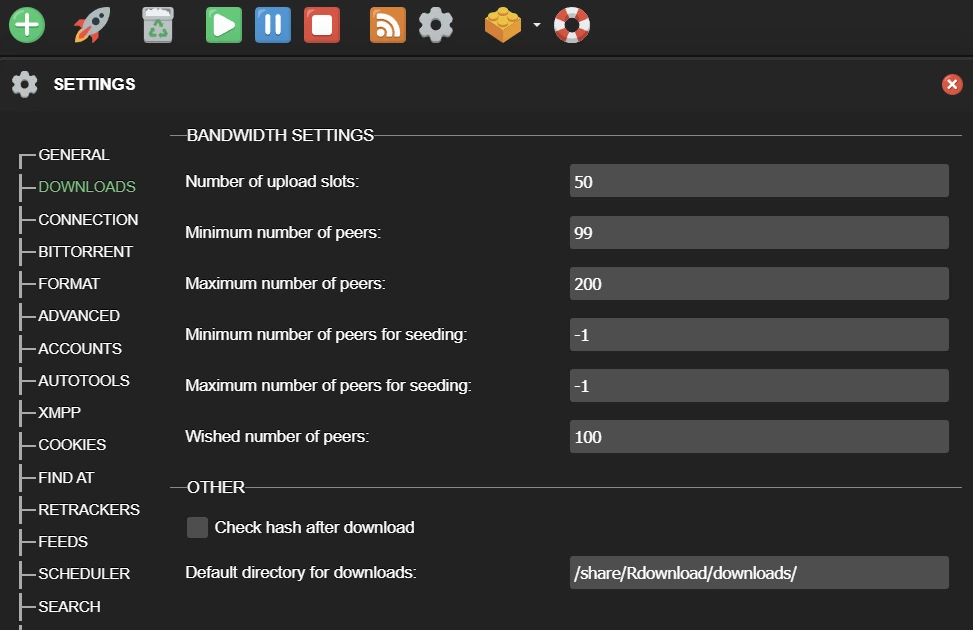
1757425234518.webp
I don't see those options, it doesn't seem to start that far.
1757428030644.png

Please provide output from those FAQ SSH commands:
Bash:
df -h /share/Rdownload
readlink -f /share/Rdownload
[nas-admin@NASHOME02 etc]$ df -h /share/Rdownload
Filesystem Size Used Available Use% Mounted on
/dev/mapper/cachedev1
19.8T 14.4T 5.4T 73% /share/CACHEDEV1_DATA

[nas-admin@NASHOME02 etc]$ readlink -f /share/Rdownload
/share/CACHEDEV1_DATA/Rdownload
 
are you sure your Rtorrent is properly installed?
have you cleaned browser cache?
I removed rtorrent.
Re-downloaded rtorrent
Renamed my old rtorrent download dir to rtorrent-old (I switched to using the Rdownload share for V16)
F12 > deleted all forms of storage for rtorrent from the browser
Re-installed rtorrent
It worked long enough for me to add 2 RSS feeds and then I got the error again

I've currently installed a older version again which works
 
Something might be wrong. Can you reach me here tomorrow and prepare teamviewer and login to your NAS by FAQ SSH?
Sure. Specific period of the day?
how to I send you the ID/Pass without everyone reading it here? I can't find a message feature on the forum
 

Użytkownicy znaleźli tą stronę używając tych słów:

  1. forum
  2. *
  3. rtorrent