
- Status
- Brak możliwości dodawania odpowiedzi.



- 5 Kwiecień 2008
- 10 298
- 2 593
- 405
- Odznaki
- 205
- QNAP
- TS-x77
- Ethernet
- 1 GbE
Poz.
6
Are you sure it's QW59 and not QW37?
yes , no beep , no image , no ip ,no reset button , nothing... :'(
- 5 Kwiecień 2008
- 10 298
- 2 593
- 405
- Odznaki
- 205
- QNAP
- TS-x77
- Ethernet
- 1 GbE
Poz.
6
And how this happen?
I guess bios is not a problem. Problem is broken CPU for 99%.
Suddenly, the boot sequence with the lights seems correct , so I wanted to test if it was due to corrupted bios
- 5 Kwiecień 2008
- 10 298
- 2 593
- 405
- Odznaki
- 205
- QNAP
- TS-x77
- Ethernet
- 1 GbE
Poz.
6
LEDS are controlled by an another PIC from QNAP. In 99% cases CPU is broken. However you can try to flash CPU. We have it in repository.
do you have the link please? I get a bit lost in the Polish / English forum translating with google


- 9 Październik 2023
- 17 319
- 701
- 355
- Odznaki
- 205
- QNAP
- null
- Ethernet
- null
Poz.
6
on bottom of forum - there's switchI get a bit lost in the Polish / English forum translating with google

- 5 Kwiecień 2008
- 10 298
- 2 593
- 405
- Odznaki
- 205
- QNAP
- TS-x77
- Ethernet
- 1 GbE
Poz.
6
Yes, I have flashed it with that file but it does not turn on either, (same result) . surely as you say it is the cpu
Anyway, thank you very much for your help !!
Hello!
I have a similar problem with my TS-253 Pro. The system board is also QW59 Rev:1.2.
When I turn on the NAS (HDMI and USB keyboard is connected) it shows a QNAP splash screen with BIOS codes in the lower right corner and ends up in a screen with EFI FAQ shell. I am not able to get in the BIOS, I think it's because the connected keyboard isn't even recorgnized (no short led blinking when connecting to the USB port of the NAS).
So I tried the method described in the QNAPedia (How to flash BIOS if USB function is disable) with the BIOS image provided here under Resources (QW37AR36) but it stops with errors...so i think maybe the BIOS files are not the right for my board...or the CPU is damaged (but will it then do anything?)...or DOM defective...not sure about that...
Are there other BIOS files for this board? Also wrote a ticket to QNAP support for BIOS files...no answer yet.
Or any other hints what I can do?
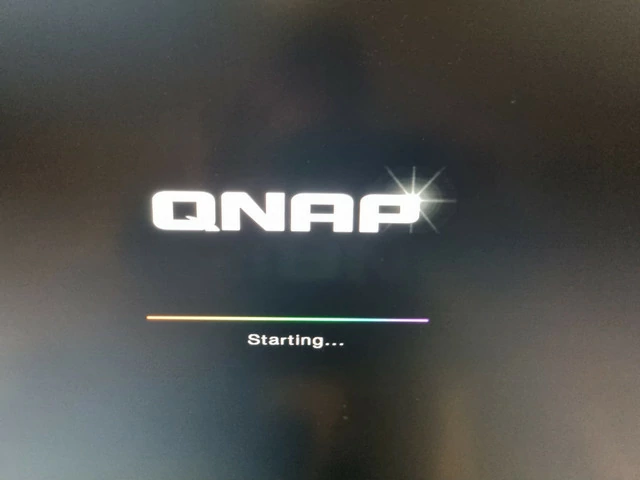

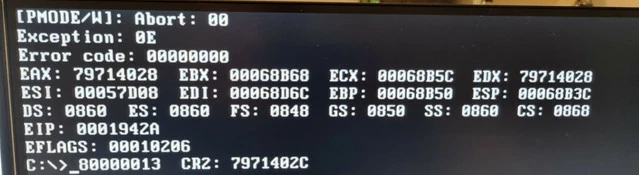
I have a similar problem with my TS-253 Pro. The system board is also QW59 Rev:1.2.
When I turn on the NAS (HDMI and USB keyboard is connected) it shows a QNAP splash screen with BIOS codes in the lower right corner and ends up in a screen with EFI FAQ shell. I am not able to get in the BIOS, I think it's because the connected keyboard isn't even recorgnized (no short led blinking when connecting to the USB port of the NAS).
So I tried the method described in the QNAPedia (How to flash BIOS if USB function is disable) with the BIOS image provided here under Resources (QW37AR36) but it stops with errors...so i think maybe the BIOS files are not the right for my board...or the CPU is damaged (but will it then do anything?)...or DOM defective...not sure about that...
Are there other BIOS files for this board? Also wrote a ticket to QNAP support for BIOS files...no answer yet.
Or any other hints what I can do?
- 9 Październik 2023
- 17 319
- 701
- 355
- Odznaki
- 205
- QNAP
- null
- Ethernet
- null
Poz.
6
- 5 Kwiecień 2008
- 10 298
- 2 593
- 405
- Odznaki
- 205
- QNAP
- TS-x77
- Ethernet
- 1 GbE
Poz.
6
Well first of all... when the BIOS is starting thats its not relates to BIOS but maybe the OS. Have you tried firmware recovery? We do not support firmware recovery and BIOS recovery at this forums.
And please understand, BIOS issue is only when there is nothing on screen and there is no BEEP. ...and when CPU is compatible and working....
And please understand, BIOS issue is only when there is nothing on screen and there is no BEEP. ...and when CPU is compatible and working....
- 5 Kwiecień 2008
- 10 298
- 2 593
- 405
- Odznaki
- 205
- QNAP
- TS-x77
- Ethernet
- 1 GbE
Poz.
6
Well i think USB are simply disabled in BIOS.
BIOS flash may recover USB to be working.
BIOS flash may recover USB to be working.
Well and that is exactly my problem, the not working USB ports.
No USB ports -> only ONE method left / found to flash BIOS without a working keyboard (that one from the QNAPedia "How to flash BIOS if USB function is disable")...but the procedere stops with the error (see pciture in my first post)
AND
No USB ports -> No firmware recovery
So my last hope is the QNAP-Support...if that fails the NAS is useless...
But nevertheless: THANK YOU!
I think you are doing great work here (even i can't read everything cause i only understand english language)
No USB ports -> only ONE method left / found to flash BIOS without a working keyboard (that one from the QNAPedia "How to flash BIOS if USB function is disable")...but the procedere stops with the error (see pciture in my first post)
AND
No USB ports -> No firmware recovery
So my last hope is the QNAP-Support...if that fails the NAS is useless...
But nevertheless: THANK YOU!
I think you are doing great work here (even i can't read everything cause i only understand english language
)
- 5 Kwiecień 2008
- 10 298
- 2 593
- 405
- Odznaki
- 205
- QNAP
- TS-x77
- Ethernet
- 1 GbE
Poz.
6
Okay lets say your USB is off
have you tried this?
How-To - Jak flashować BIOS po wyłączeniu obsługi USB na którym pracuje DOM (Disk-On-Module) ? | QNAP Polska - Oficjalne forum wsparcia technicznego QNAP Club
have you tried this?
How-To - Jak flashować BIOS po wyłączeniu obsługi USB na którym pracuje DOM (Disk-On-Module) ? | QNAP Polska - Oficjalne forum wsparcia technicznego QNAP Club
Yes, I have done exactly what is described in the thread you mentioned. But I was stuck when it came to flashing: ABORTED!
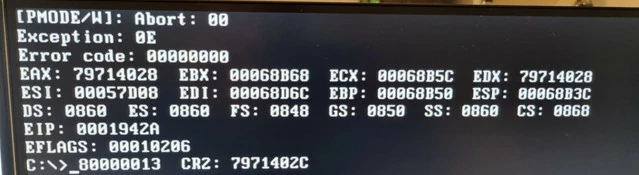
I used the BIOS files from the download section (QW37AR36).
That is what brings me to the idea that the files are wrong for my NAS...
...if there is anybody out there who has a Dump of his BIOS i could use -> beautiful!
If not, last hope is official QNAP-Support can offer the right files!
Ah and what I read in the manual for AFUDOS (Rom Utility for flashing): Exception 0E seems to be "ROM file size incorrect". That's once more a sign that I use the wrong BIN-File...
I used the BIOS files from the download section (QW37AR36).
That is what brings me to the idea that the files are wrong for my NAS...
...if there is anybody out there who has a Dump of his BIOS i could use -> beautiful!
If not, last hope is official QNAP-Support can offer the right files!
Ah and what I read in the manual for AFUDOS (Rom Utility for flashing): Exception 0E seems to be "ROM file size incorrect". That's once more a sign that I use the wrong BIN-File...



- 9 Październik 2019
- 753
- 391
- 195
- Odznaki
- 123
- QNAP
- TS-x73A
- Ethernet
- 1 GbE
Poz.
5
- Status
- Brak możliwości dodawania odpowiedzi.
Podobne tematy

- Odpowiedzi
- 0
- Wyświetleń
- 362
- Odpowiedzi
- 2
- Wyświetleń
- 231

- Odpowiedzi
- 10
- Wyświetleń
- 2K
- Artykuł
- Odpowiedzi
- 0
- Wyświetleń
- 241
- Artykuł
- Odpowiedzi
- 0
- Wyświetleń
- 313
Użytkownicy znaleźli tą stronę używając tych słów:
- bios
- qw37ar36
- qw59
- flash bios ts-253 pro
- Ts-253 pro
- bios 253 pro
- ts-253 bios
- BIOS TS-469
- Q37AR22
- BIOS 253
- bios 453
- ts-253
- firmware
- BIOS download
- TS-X53
- BIOS x53
- usb keyboard don't work in bios
- bios x69
- qw37
- Winbond 25Q64FWSIG
- Bios ts-230
- ts 453 pro bios
- TS-253 pro bios
- QNAP TS-253 Pro QW59 Rev: 1.2 Bios
- afudos
- usb disabled