Podążaj za instrukcjami w poniższym filmie, aby zobaczyć, jak zainstalować naszą stronę jako aplikację internetową na ekranie głównym swojego urządzenia.
Informacja: Ta funkcja może nie być dostępna w niektórych przeglądarkach.
Używasz przestarzałej przeglądarki. Może ona nie wyświetlać poprawnie tej lub innych stron internetowych. Powinieneś zaktualizować swoją przeglądarkę lub użyć alternatywnej przeglądarki.
The Media library leaves a seeding torrent's files in place. Nothing it does by itself moves or renames the files a torrent seeds from. With Finished downloads set to Move, the automatic Movie Agent now files a hardlink of the torrent's data (a copy when the library is on another volume), and the torrent keeps seeding. The rescrape window offers our copy in the completed folder, a move you choose by hand names the torrents it would stop before you press Apply, and while rtorrent does not answer nothing is moved or renamed.
Scraper history: Re-run waits for Undo. While a run's result is still in place, Re-run is greyed and its tooltip says to undo first. A failed row whose download folder is gone says so in words. Game Agent rows now have Undo (the release name comes back) and Re-run, and Undo of a move takes the film out of the library, so Re-run files it again.
Sync subtitles to speech… in the Media studio. On a subtitle track's menu: the NAS listens to the film's speech and proposes the frame rate or speed and the shift; Apply moves every subtitle as one step you can undo. Subtitles that do not match the film are refused, and nothing changes.
Peers come back after a stall. When rtorrent stands still for minutes and every peer drops a downloading torrent, the torrent connects to the same peers again within about half a minute, without asking the tracker. A private torrent used to wait for its tracker's next answer.
Minor
Save as MKV measures every sound track it writes in the saved file: the job's lines give each track's loudness, and the studio's Info shows the saved file's levels before and after.
The browser tab's icon is the R alone at full size. While torrents download it moves and shows how many, it flashes when one finishes, and the tab's title shows the download and upload speeds while data moves. Two switches in Profile › Themes › Browser tab turn them off.
Media library settings stand two fields to a line on a wide screen, Movie Agent is a plain on/off switch, and every clickable part of the Download routing and How seeding ends pictures has a dashed underline.
The Subtitles window's button reads Download as default.
Files' job tray gives a running job's status line a line of its own instead of cutting it, and the levels in the Media studio stop asking after three measurements with nothing to read and offer Try again.
Fixes from a user's diagnostic file: a busy rtorrent no longer breaks the five-minute auto-tuning pass, port forwarding maps only the port rtorrent uses, the logs follow the NAS's clock with QTS's own time zone names, the diagnostic file lists the trackers' state, and the note at the peer limit says the real reason.
Known issue in this version: on a film not changed yet in the Media studio, Sync subtitles to speech… says the file is not in the project. Make any change and undo it, then ask again. On a subtitle track the studio has not shown yet, the first ask says its subtitles are not read yet; the second ask works.
Every background job says what it does. The background jobs list and the Files job tray name each job and what it works on, for example "Translating subtitles · C2 → Polish" above the film's name. Add voice-over… keeps its title through every step. While it mixes the voice into the sound, its line now says "Mixing: 42%" and then "42% of the new file" instead of standing still on the last subtitle read, its bar moves with the time, and Stop works at every step.
Choose the engine for one run. Translate subtitles, Create subtitles from speech, Create speech track from subtitles and Add voice-over each have an Advanced part. Closed, it says in one line what the run will use; open, it lets this run use another engine, model or voice. Nothing is saved: the defaults stay in Media library › AI translation and speech, which is now laid out like the other Media library settings, with its explanations under "?".
The Media studio works without a key. Translate subtitles and Create speech track from subtitles run on the built-in engines on the NAS (Argos or Bergamot to translate, Piper to read aloud), the same ones Add voice-over uses. The built-in voice has a sample button.
Minor
Quick access: the DHT, Ports and Auto-tuning strips have the same edge as the tiles, and a row lights up under the mouse as it does in Full view.
A panel tab left open during an upgrade keeps working when it opens a window whose file the upgrade removed: it reloads the page to get the new version, and if it cannot, only that window stays closed. Before, the page stopped drawing at that point, which is why the selection bar sometimes did not appear after the trash button in Quick access.
Send to Media library: when the film is already in the library, Show in the library takes you to it, next to Replace.
The English panel says "subtitles" everywhere, the AI features have clearer names, and the Media studio's buttons have icons.
Corrected Polish texts in the rescrape window and in the levels of the Media studio's Info panel.
Rescrape (Movie Agent) lists your downloads again. Rtorrent 16 can keep its logs, settings and temporary files in a folder you choose, and on some installs that folder is the base folder itself (an upgrade to 16.25-09U, Repair configs and a base folder switch set it that way). On such an install the rescrape window refused every download in the base folder with "A package or NAS folder, not a download", so nothing could be ticked. Now the window leaves out only the package itself and its logs, settings and temp folders, and each folder it leaves out says why. Rescrape (Game Agent) and Apply use the same check. Thanks to the community.qnap.com user who reported it with a screenshot.
Minor
Levels in the Media studio's Info. Select an audio clip and Info lists every channel of its track with peak, true peak and RMS, then the track's loudness and loudness range. For a voice-over track that Add voice-over… makes from this version on, each channel shows the original track's values with the voice-over's below them. On a phone the same table is in the track's window.
Two Media studio errors fixed. The poster in the Project panel of a film with a single key frame, and a thumbnail past a film's last key frame, came back as an error; they now show the key frame before that point. A film opened in the studio before its project was saved asked for its speech jobs and got an error; it now gets an empty list.
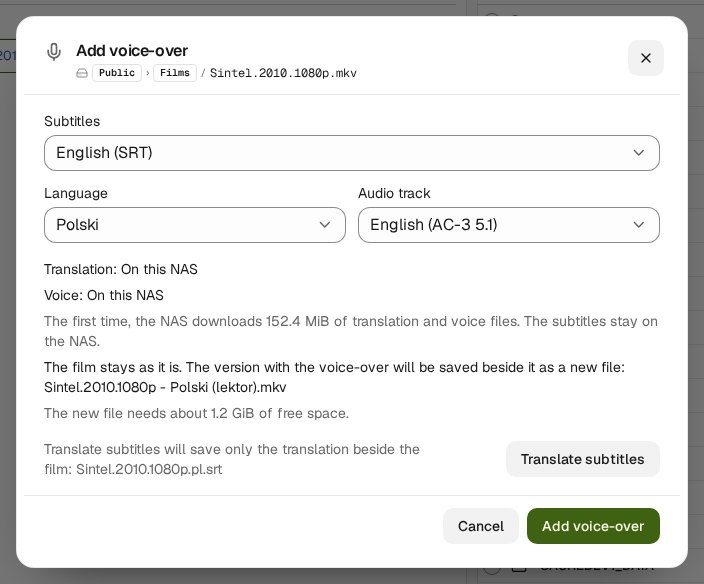
A voice-over in a few clicks, without any key. In Files, open a film's menu and choose Tools › Add voice-over…. The window has already picked the subtitles, the language and the sound track. Press Add voice-over and one job in the jobs list does the rest; you can stop it at any time. The NAS translates the subtitles, reads them aloud, mixes the voice into the centre channel (both sides in a stereo film) with the original about 5 dB quieter under it, and saves Film - Polski (lektor).mkv beside the film. The new file keeps every track of the film; the voice-over track comes right after the original sound and plays by default. The film itself is not changed, so a torrent that seeds it keeps its data.
Everything on the NAS. Without a key the subtitles never leave the NAS: Argos translates English into Polish, Bergamot (the engine behind Firefox's translations) every other pair, and a Piper voice reads (Polish, German, French, Italian, Dutch or Swedish). When the film already has subtitles in the language you pick, the window uses them and translates nothing. The first time, the NAS downloads the programs and models it needs from pub.qnaputilities.com (about 152 MiB for English into Polish) and shows each download in the job. On a test NAS (QTS, x86_64) a 15-minute film with 5.1 sound took about two and a half minutes and at most 264 MB of memory.
With your own OpenAI or ElevenLabs key, their models translate and their voices read. In Media library › AI translation and speech › Voice-over you can still keep the voice-over on the NAS (On this NAS, without a key).
Translate subtitles in the same window saves only the translation beside the film, as Film.pl.srt, which Plex, Jellyfin, Emby and Kodi read. It works for an MP4 too.
Minor
In the Media studio, a film's captions track has Add voice-over… in its menu and in Info.
Preview Read Aloud in the Media studio now lowers the original by 5 dB, gently, as the saved voice-over does (before: 12 dB, at once).
Media library › AI translation and speech. The OpenAI and ElevenLabs keys and the models that Translate Captions, Transcribe to Captions and Read Captions Aloud use now live in the Media library's settings, right after Subtitles. They are no longer under Settings › Files & storage. At first you see only the two key fields. Paste a key and press Save and check: the NAS asks the service which models this key can use, and only then do the choices appear. You pick models from a list instead of typing their names. Each model says in a few words what it is, and the line under the box says why you would choose it. Translation starts on gpt-6-luna and reading aloud on gpt-audio-1.5. If you kept the old reading settings (tts-1 with the voice alloy), Read Captions Aloud now uses gpt-audio-1.5 with the voice cedar; OpenAI retires tts-1 on 6 January 2027.
Voice samples. The play button beside Voice plays a sample: ElevenLabs' own sample of the voice, or for OpenAI a short sentence read once with your key and then kept on the NAS.
Clear key errors. A key that works but lacks a permission now says which one and what to allow. A restricted ElevenLabs key needs Voices (Read), Text to Speech and Speech to Text.
Minor
RSS › Log: a pass started with Run now or Check now could be missing from the Log for one refresh after it ended. The Log now shows it as soon as its job is gone.
CA certificates now keep themselves current. Each release ships the newest Mozilla list of trusted certificate authorities (in this one, the list of 2026-11-05), and once a day the NAS asks curl.se whether a newer list exists. A newer list replaces the old one only after its checksum matches and every certificate in it can be read. rtorrent, the panel and curl trust this list instead of the firmware's, and an upgrade no longer puts back the list of the first install.
Guides › Media studio: AI subtitle translation and an AI voice-over, step by step. A new section, in English and Polish, from the API keys to the saved MKV, with figures drawn from the studio's own windows.
Files › Subtitles: each service is a badge. The five subtitle services show as one row of badges with the state's colour, an icon and the number of subtitles found. Tap or hover a badge for the full sentence.
Captions you made in the Media studio are saved again. A captions track without a clip (made by Transcribe to Captions, its translation, or Add captions track) was left out of Save as MKV… and Export… without a word. It is now saved and exported like any other track.
QuTS hero: the studio no longer stops for memory it can get. Waveforms, captions, key frames and preview copies waited while the ZFS cache held the memory, although the NAS gives that cache back on request. Rtorrent 16 now counts the part of the ZFS cache the NAS can give back as free memory.
Minor
QuTS hero: the Dashboard's Processor and memory card shows the ZFS cache as its own part of the memory chart.
The support report of Diagnostics keeps the panel's web server settings as they are shipped.
rtorrent's session now keeps the newest save of a torrent when several come at once. This is a fix from rtorrent's author, carried on our version of rtorrent, so a moved or finished torrent is found in its new folder after a power cut.
Minor
Settings › Files & storage › Speech service: under each API key field, Create a key at OpenAI and Create a key at ElevenLabs open the service's key page in a new tab.
Moving torrents waits until rtorrent has saved the new place. Each torrent's move finishes only after rtorrent's session file names its new folder. Before, an older save could land last, and after a power cut before rtorrent's next automatic save, rtorrent could look for the files in the old folder. If rtorrent does not confirm the save within 20 seconds, the move still finishes and the System Logs say so.
The Rtorrent 16 intro is off unless you switch it on:Profile › Login › Rtorrent 16 intro at sign-in.
Minor
The profile, the language and Sign out at the foot of the menu share one height, one font and one column for their icons.
Midnight: its lines shoot up from the bottom edge of the page.
The Search tile on the Launcher says what it searches.
Popups have one frame in every theme.
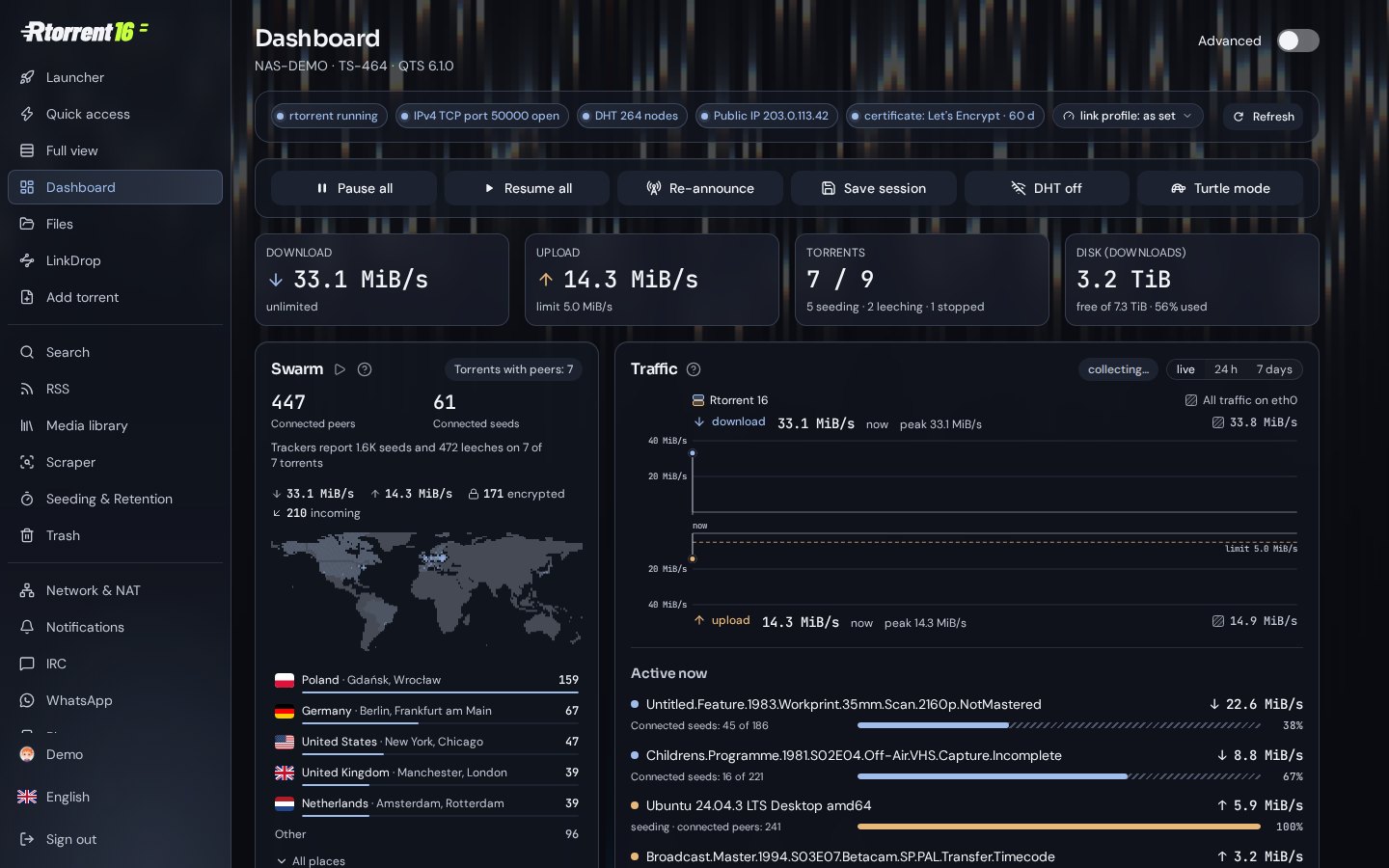
The Download, Upload, Torrents and Disk tiles on the Dashboard have an edge, like the panels beside them.
Leaving the Media studio while the NAS still works on the film asks first, also before you have changed anything. The question also lists the Transcribe to Captions, Read Captions Aloud and Translate Captions jobs you started: Keep running leaves them, Stop ends them.
Translate Captions no longer fails when the translation joins or splits a caption's lines; the NAS wraps the lines itself.
When an installation pauses a running job, the "Paused …" line always reaches the System Logs.
Saving to MKV in the Media studio with an imported subtitle file works again. Since 16.27-12E, Save as MKV… stopped with an error when the project had a captions file added with Import…. The save now finishes, with the captions' styles kept and a font you imported attached to the file.