
- Status
- Brak możliwości dodawania odpowiedzi.


- 9 Październik 2023
- 17 316
- 686
- 355
- Odznaki
- 205
- QNAP
- null
- Ethernet
- null
Poz.
6
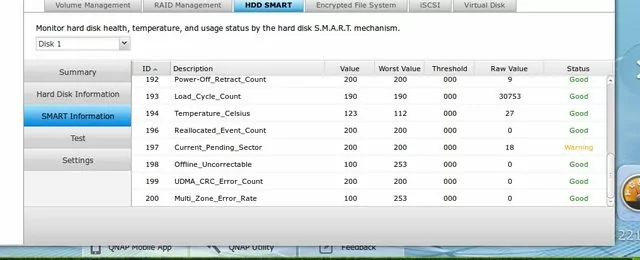
masz 18 sektorów które czekają na przeniesienie, puść sprawdzenie dysku, jak nie zejdzie, sprawdź dysk w kompie za pomocą programu producenta i tam będzie odniesienie.


- 4 Marzec 2014
- 56
- 7
- 85
- Odznaki
- 19
- QNAP
- TS-x51+
- Ethernet
- 1 GbE
Poz.
1
Test dysku zrobilem. Rapid test: Test completed and no errors found.
Complete test: Completed. Read failure.
Mam tylko laptopa i nie mam jak podpiac dysku. Cos wymysle.
Complete test: Completed. Read failure.
Mam tylko laptopa i nie mam jak podpiac dysku. Cos wymysle.
- 9 Październik 2023
- 17 316
- 686
- 355
- Odznaki
- 205
- QNAP
- null
- Ethernet
- null
Poz.
6
- 4 Marzec 2014
- 56
- 7
- 85
- Odznaki
- 19
- QNAP
- TS-x51+
- Ethernet
- 1 GbE
Poz.
1
- 9 Październik 2023
- 17 316
- 686
- 355
- Odznaki
- 205
- QNAP
- null
- Ethernet
- null
Poz.
6
- 4 Marzec 2014
- 56
- 7
- 85
- Odznaki
- 19
- QNAP
- TS-x51+
- Ethernet
- 1 GbE
Poz.
1
Wyjalem dysk i udalo mi sie go podlaczyc do innego kompa pod windowsem. Formatuje sie teraz, idzie powoli bo odznaczylem "szybkie formatowanie".
Wczesniej wlączylem HDtune i tez pokazalo Current pending sector - 18. Ale Health status pokazalo OK
Wiec zobaczymy co przyniesie ten format.
Wczesniej wlączylem HDtune i tez pokazalo Current pending sector - 18. Ale Health status pokazalo OK
Wiec zobaczymy co przyniesie ten format.

Pewnie nicWiec zobaczymy co przyniesie ten format.

Sciagnij: http://download.wdc.com/windlg/WinDlg_v1_27.zip?v=5103
Instructions
- Download the Windows Data Lifeguard Diagnostics, WinDlg_v1_27.zip
- Extract and run the program, WinDlg.exe. If running Windows Vista (or later), you will need to Right-Click on the WinDlg.exe file and choose to Run As Administrator.
- Read and accept the license agreement to continue.
- On the main program screen, there are two windows. In the top window, you will see the drives in your system that are available for testing. The model number, serial number, capacity, and SMART status of each drive will be displayed. In the bottom window, the partition information for the selected drive will be displayed.
- Highlight the drive and select the icon on the top row to test or run SMART status.
- When you select the run tests icon, the "DLGDIAG - Select an Option" window appears.
- You will see the following options:
- QUICK TEST - performs SMART drive quick self-test to gather and verify the Data Lifeguard information contained on the drive.
- EXTENDED TEST - performs a Full Media Scan to detect bad sectors. Test may take several hours to complete depending on the size of the drive.
- WRITE ZEROS - writes zeros to the drive with options of Full Erase and Quick Erase. File system and data will be lost.
- VIEW TEST RESULT - displays the latest test results.
- Select the test you wish to perform and click the Start button.
- When the test completes, you will be notified with a pass/fail message. Click the Close button.
- 4 Marzec 2014
- 56
- 7
- 85
- Odznaki
- 19
- QNAP
- TS-x51+
- Ethernet
- 1 GbE
Poz.
1
Pewnie nicWiec zobaczymy co przyniesie ten format.
Sciagnij: http://download.wdc.com/windlg/WinDlg_v1_27.zip?v=5103
Instructions
- Download the Windows Data Lifeguard Diagnostics, WinDlg_v1_27.zip
- Extract and run the program, WinDlg.exe. If running Windows Vista (or later), you will need to Right-Click on the WinDlg.exe file and choose to Run As Administrator.
- Read and accept the license agreement to continue.
- On the main program screen, there are two windows. In the top window, you will see the drives in your system that are available for testing. The model number, serial number, capacity, and SMART status of each drive will be displayed. In the bottom window, the partition information for the selected drive will be displayed.
- Highlight the drive and select the icon on the top row to test or run SMART status.
- When you select the run tests icon, the "DLGDIAG - Select an Option" window appears.
- You will see the following options:
- QUICK TEST - performs SMART drive quick self-test to gather and verify the Data Lifeguard information contained on the drive.
- EXTENDED TEST - performs a Full Media Scan to detect bad sectors. Test may take several hours to complete depending on the size of the drive.
- WRITE ZEROS - writes zeros to the drive with options of Full Erase and Quick Erase. File system and data will be lost.
- VIEW TEST RESULT - displays the latest test results.
- Select the test you wish to perform and click the Start button.
- When the test completes, you will be notified with a pass/fail message. Click the Close button.
Dzięki. Jutro to scigne i odpale. Nie chce juz teraz przerywac tego formatowania. 17%
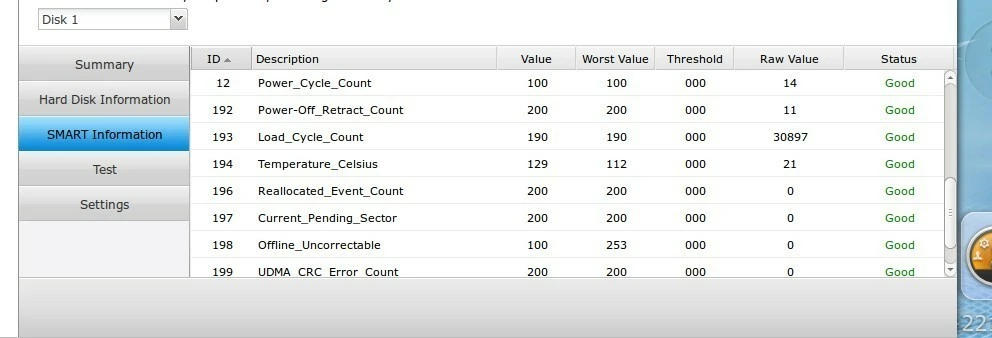
Więc tak. Dzisiaj rano sprawdzilem dysk, skonczyl sie formatowac i okazalo sie, ze Current Pending sector z 18 zmienl wartosc na 0.
Wsadzilem go wlasnie do NAS i zaczal robic REBUILDING. Mysle, ze to tez sporo potrwa. Nie da sie jakos zobaczyc % progresu?
- 9 Październik 2023
- 17 316
- 686
- 355
- Odznaki
- 205
- QNAP
- null
- Ethernet
- null
Poz.
6
Aby przyśpieszyć odbudowę macierzy w QNAPie:
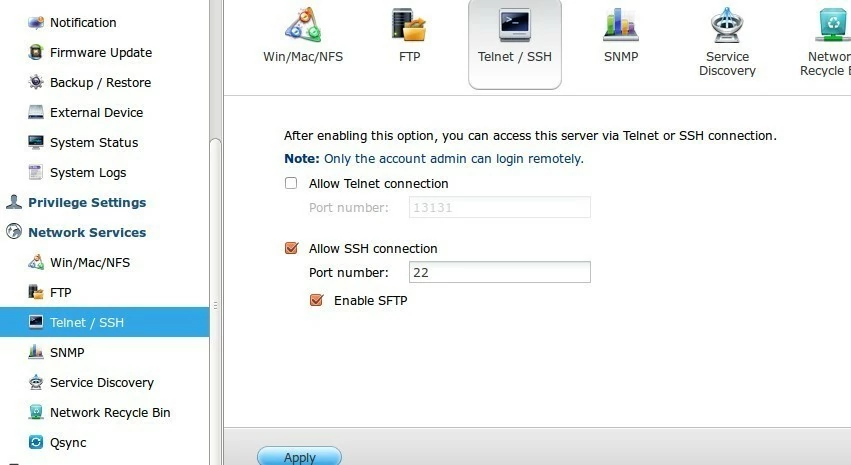
Zaloguj się FAQ SSH:
Odczytaj prędkości:
cat /proc/sys/dev/raid/speed_limit_max
cat /proc/sys/dev/raid/speed_limit_min
Zwiększ:
echo 50000 >/proc/sys/dev/raid/speed_limit_min
echo 150000 >/proc/sys/dev/raid/speed_limit_max
Informacje o odbudowie:
cat /proc/mdstat
while true; do date +"%T";cat /proc/mdstat; sleep 5; done
Zaloguj się FAQ SSH:
Odczytaj prędkości:
cat /proc/sys/dev/raid/speed_limit_max
cat /proc/sys/dev/raid/speed_limit_min
Zwiększ:
echo 50000 >/proc/sys/dev/raid/speed_limit_min
echo 150000 >/proc/sys/dev/raid/speed_limit_max
Informacje o odbudowie:
cat /proc/mdstat
while true; do date +"%T";cat /proc/mdstat; sleep 5; done
- 4 Marzec 2014
- 56
- 7
- 85
- Odznaki
- 19
- QNAP
- TS-x51+
- Ethernet
- 1 GbE
Poz.
1
- 9 Październik 2023
- 17 316
- 686
- 355
- Odznaki
- 205
- QNAP
- null
- Ethernet
- null
Poz.
6
- 9 Październik 2023
- 17 316
- 686
- 355
- Odznaki
- 205
- QNAP
- null
- Ethernet
- null
Poz.
6
Gdyz, to byly sektory czekajace na alokacje - i zostaly zaalokowane, wartosci Reallocated Event Count - powinna sie zwiekszyc o te 18 (moze byc wiecej, jesli czesniej byly tez problemy).Więc tak. Dzisiaj rano sprawdzilem dysk, skonczyl sie formatowac i okazalo sie, ze Current Pending sector z 18 zmienl wartosc na 0.
- 4 Marzec 2014
- 56
- 7
- 85
- Odznaki
- 19
- QNAP
- TS-x51+
- Ethernet
- 1 GbE
Poz.
1
No i mamy cos takiego. Wszystko jest GOOD ale nadal mam WARNING jak sie loguje.
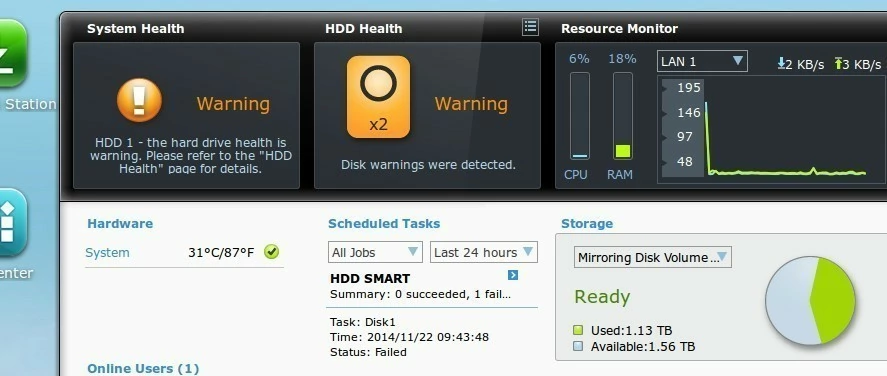
edit: jak probuje zrobic test dysku, to mam Read Failure.
edit: jak probuje zrobic test dysku, to mam Read Failure.
Propomuje:
1. wyjac dysk
2. podlaczyc pod PC/Laptopa
3. odpalic program od producenta Rozwiązany - Current pending sector - Warning
4. w zaleznosci od wynikow - zakladam, ze zwroci bledy
5. oddac na gwarancji do sklepu lub odeslac do producenta na gwarancji.
1. wyjac dysk
2. podlaczyc pod PC/Laptopa
3. odpalic program od producenta Rozwiązany - Current pending sector - Warning
4. w zaleznosci od wynikow - zakladam, ze zwroci bledy
5. oddac na gwarancji do sklepu lub odeslac do producenta na gwarancji.
- 4 Marzec 2014
- 56
- 7
- 85
- Odznaki
- 19
- QNAP
- TS-x51+
- Ethernet
- 1 GbE
Poz.
1
Sciagnalem ten program i odpalilem testy.
Zrobilem test szybki i potem Extended, ktory zajal chyba z 7 godzin. Zadnych blędow.
Test Option: QUICK TEST
Model Number: WDC WD30EFRX-68EUZN0
Unit Serial Number: WD-WMC4N1037212
Firmware Number: 80.00A80
Capacity: 3000.59 GB
SMART Status: PASS
Test Result: PASS
Test Time: 13:30:16, November 22, 2014
Test Option: EXTENDED TEST
Model Number: WDC WD30EFRX-68EUZN0
Unit Serial Number: WD-WMC4N1037212
Firmware Number: 80.00A80
Capacity: 3000.59 GB
SMART Status: PASS
Test Result: PASS
Test Time: 21:36:51, November 22, 2014
Zrobilem test szybki i potem Extended, ktory zajal chyba z 7 godzin. Zadnych blędow.
Test Option: QUICK TEST
Model Number: WDC WD30EFRX-68EUZN0
Unit Serial Number: WD-WMC4N1037212
Firmware Number: 80.00A80
Capacity: 3000.59 GB
SMART Status: PASS
Test Result: PASS
Test Time: 13:30:16, November 22, 2014
Test Option: EXTENDED TEST
Model Number: WDC WD30EFRX-68EUZN0
Unit Serial Number: WD-WMC4N1037212
Firmware Number: 80.00A80
Capacity: 3000.59 GB
SMART Status: PASS
Test Result: PASS
Test Time: 21:36:51, November 22, 2014
A ten program od WD, daje opcje odczytania wszystkich atrybutow SMART? - jesli tak to jakie sa wartosci,
mozesz rowniesz zapodac HD Tune PRO i CristalDisk Info (ale zdaje sie, ze najnowsza wersja dziala gorzej niz poprzednia - u mnie nie widziala najnowasza kieszeni, a stara jak najbardziej)
mozesz rowniesz zapodac HD Tune PRO i CristalDisk Info (ale zdaje sie, ze najnowsza wersja dziala gorzej niz poprzednia - u mnie nie widziala najnowasza kieszeni, a stara jak najbardziej)
- Status
- Brak możliwości dodawania odpowiedzi.
Podobne tematy

- Pytanie
- Odpowiedzi
- 8
- Wyświetleń
- 3K


- Artykuł
- Odpowiedzi
- 0
- Wyświetleń
- 313
- Odpowiedzi
- 0
- Wyświetleń
- 442
- Odpowiedzi
- 0
- Wyświetleń
- 350

- Pytanie
- Odpowiedzi
- 6
- Wyświetleń
- 2K
Użytkownicy znaleźli tą stronę używając tych słów:
- sprawdzenie dysku
- current pending sector
- pending sectors