Podążaj za instrukcjami w poniższym filmie, aby zobaczyć, jak zainstalować naszą stronę jako aplikację internetową na ekranie głównym swojego urządzenia.
Informacja: Ta funkcja może nie być dostępna w niektórych przeglądarkach.
Używasz przestarzałej przeglądarki. Może ona nie wyświetlać poprawnie tej lub innych stron internetowych. Powinieneś zaktualizować swoją przeglądarkę lub użyć alternatywnej przeglądarki.
Messages in Files, LinkDrop, the trash and unpacking read the way DOS put them: Write-protected, Access denied, Not found, Disk full, Already exists, Cannot write to. Each message has an icon of its kind on the left: stop, error, warning, question or information.
Files: an .nfo or .diz file opens on the classic CP437 grid in the VGA font, so its art lines up, on a phone too.
Dashboard: the Processor and memory card draws live, like the Performance charts, and adds Jobs: the programs Rtorrent 16 starts for work, such as unpacking, packing, converting and checksums. rtorrent's memory shows its own part; its mapped torrent files and the piece cache are listed under the chart.
If another program holds the BitTorrent port when rtorrent starts, rtorrent takes the nearest free port for that start and the panel says so in red. The saved port does not change.
Minor
Files: a third retro look, Total Commander (Themes, or the third press of Ctrl+Alt+R).
Files: Extract to… with the other panel on the list of shares opens the folder picker.
The eight newer themes have a slow dithered background and one leading colour. The eleven older themes look as before.
Popup menus have one clean border. The torrent menu's icons stand on one line, without "0/1". A right-click or a long press anywhere in an opened torrent opens its menu.
ruTorrent can be switched off: Settings → Web access → ruTorrent. While it is off, its page says so and none of its plugins run. The panel, /RPC2, the phone app, the add-ons and the RSS page work without it. A new install starts with ruTorrent off; an update keeps it as it was.
RSS: each feed has its own Refresh time (Auto, or 5 minutes to 24 hours), each rule its own Folder, and after an import from ruTorrent, Turn off ruTorrent's RSS leaves the feeds to the RSS page alone.
Files on a phone: the viewer's bar folds into ⋯ with a badge for Viewing, Editing or Hex, and the text is the phone's size. Logs open with Find, rotated and .gz ones too, and a large log opens at its end.
Files: Convert has settings (Same as source, Smaller file, Much smaller file, Custom). Pack names the archive after the selection. A disc image that cannot be opened says what it is; an SACD image opens in the music player.
Dashboard: a Processor and memory card for rtorrent, its services and add-ons, and the whole NAS: live, 24 hours and 7 days.
Minor
Download slots: when every slot of a download is taken and other peers wait, the slowest holders hand their slots to the peers that waited longest. This now happens inside libtorrent's own 30-second choke cycle, with no extra pass; 10 000 seeding torrents use the same CPU as libtorrent without the rotation. The libtorrent pull request #1042 carries the same change.
LinkDrop shares a folder inside the download, completed or library folder, also when the base folder is the top of a share. It still refuses Rtorrent 16's own folders: logs, settings, temporary files, the session, the backups and the trash.
On a phone, Full view is gone from the menu and the launcher; its address opens Quick access with the same filter.
Themes: all nineteen were checked page by page and made easier to read. A good result shows in the theme's accent colour, and a row's optional buttons keep a column of their own.
Settings: a section's restart count matches the fields its card shows.
Full view: the rows no longer have a … button. Right-click a row, or press the context-menu key or Shift+F10, for its menu. On a phone, tick the row's box and press … on the selection bar; where the browser opens a menu on a long press (Chrome on Android), holding a finger on the row works too.
Add can save a torrent to a folder in any share, not only the download share. It uses exactly the folder you pick, also when its name ends in a space.
Eight new appearances under Appearance: Relay, Kiln, Folio, Amplitude, Opaline, Diffraction, Canopy and Noctilux, each light and dark. Lime stays the default.
Minor
The menu is in four groups. Full view sits between Quick access and Dashboard, and the phone launcher is four compact rows.
The header shows the package version and its build number.
Settings → Connection profiles: 1 Gbps, 2.5 Gbps, 10 Gbps and Custom…. More fields are Basic or Advanced, and a service now says when it is off, not set up or not available.
Network tuning is on when it was never saved before. A choice you saved stays.
Short hints and help windows open inside the window you are in. Action icons are easier to tell apart, menus have rounded corners, and log headers wrap on narrow screens.
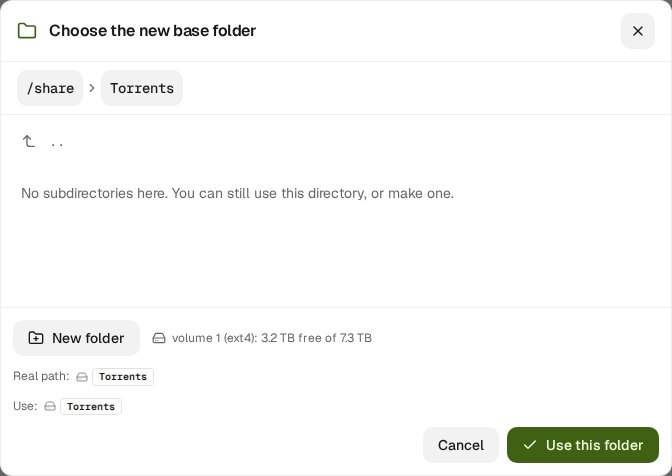
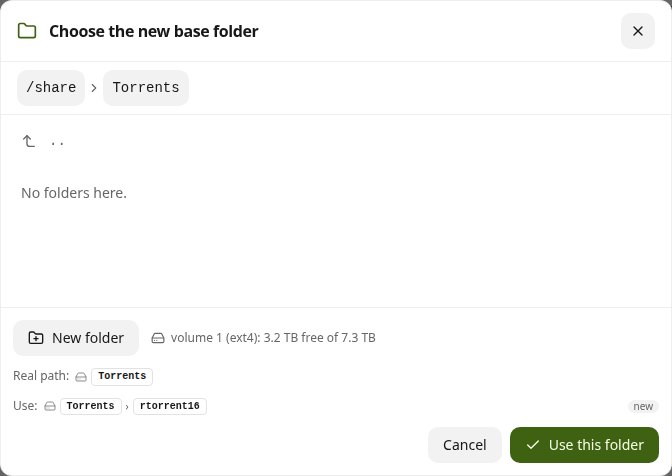
A share of its own can be the base folder. Move to another volume… takes the folder you open as it is and adds no name, so a share made for Rtorrent 16 is used directly. downloads, complete, watch and medialibrary are made inside it.
Minor
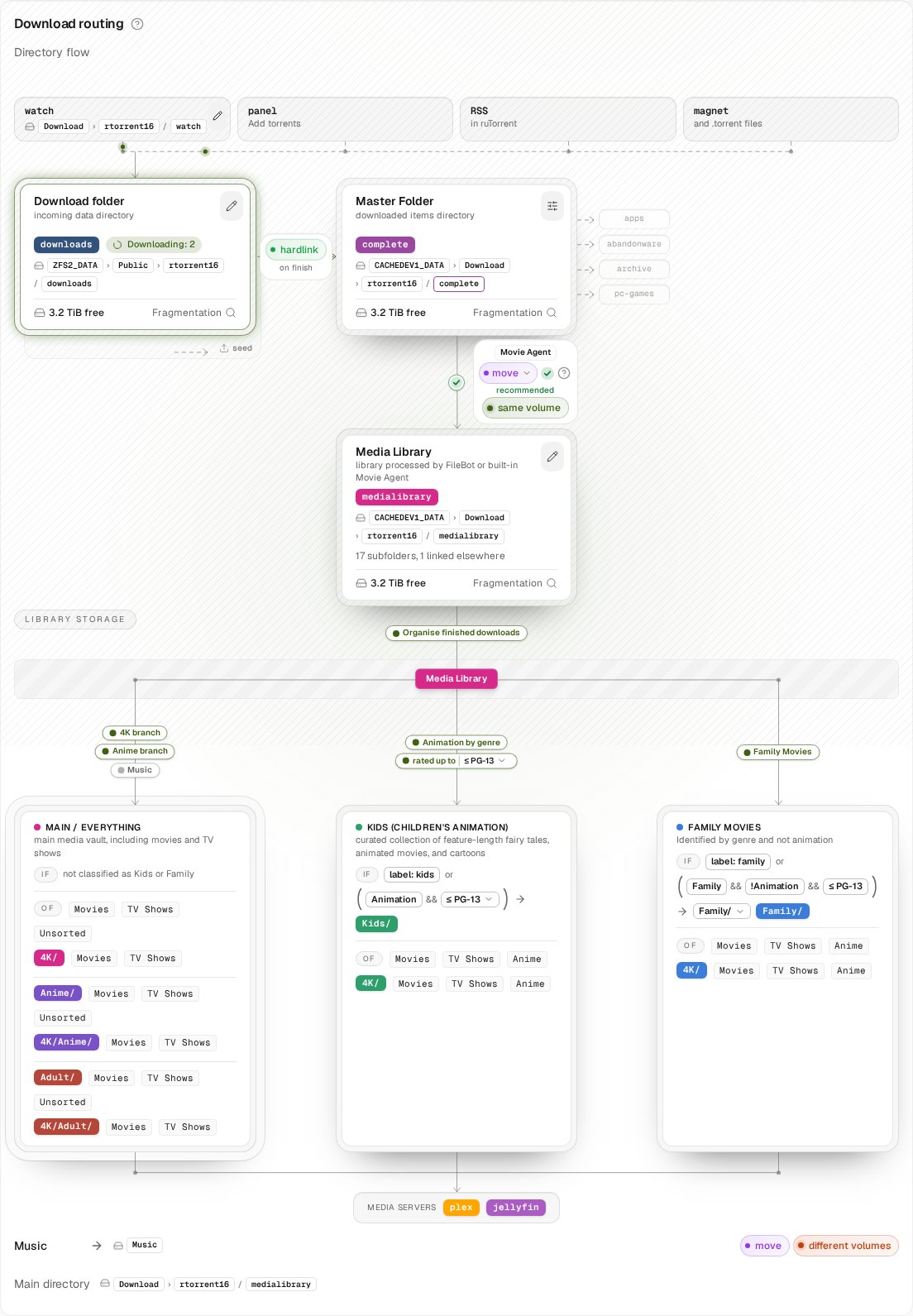
Media library: on the routing card, the block for the folder rtorrent downloads to is now called Download folder. Base folder is only the folder at the top of Settings → Files & storage.
The folder for the package's own files works like the other folder fields: the browser adds rtorrent16 only when the folder you open holds other folders, and you can drop it.
Questions and answers: the hard-link answer says plainly what goes where.
Settings → Files & storage starts with Base folder: where new downloads, completed copies, the watch folder and the media library go, with its volume and free space.
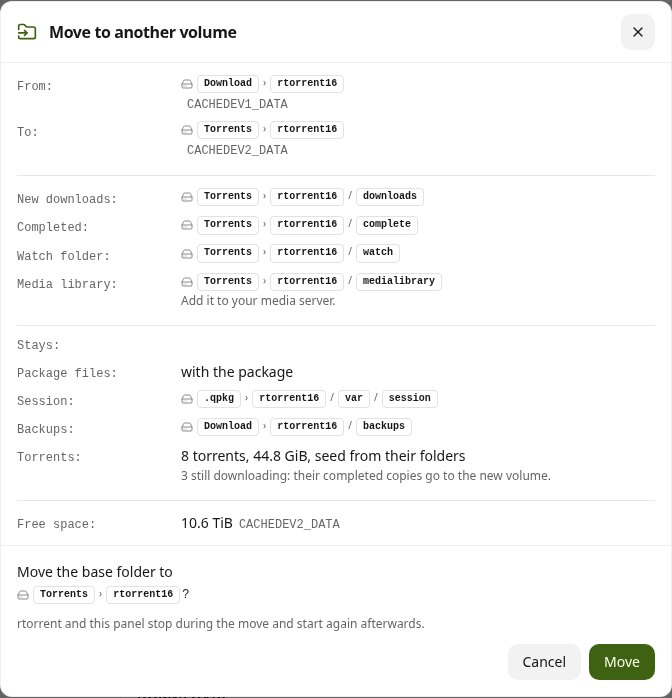
Move to another volume… moves the base folder to another volume. From then on new downloads go there. Your torrents keep seeding from their folders and are not checked again; the session and the backups stay where they are. A summary shows what moves and what stays before you confirm.
The folder browser proposes the folder name, like an installer: open a share and it adds rtorrent16 (or downloads, complete, watch) to the path. Press the name to drop it.
Minor
Seeding rules: every volume has its own trash. Deleted data stay on their own volume and are never copied to another one.
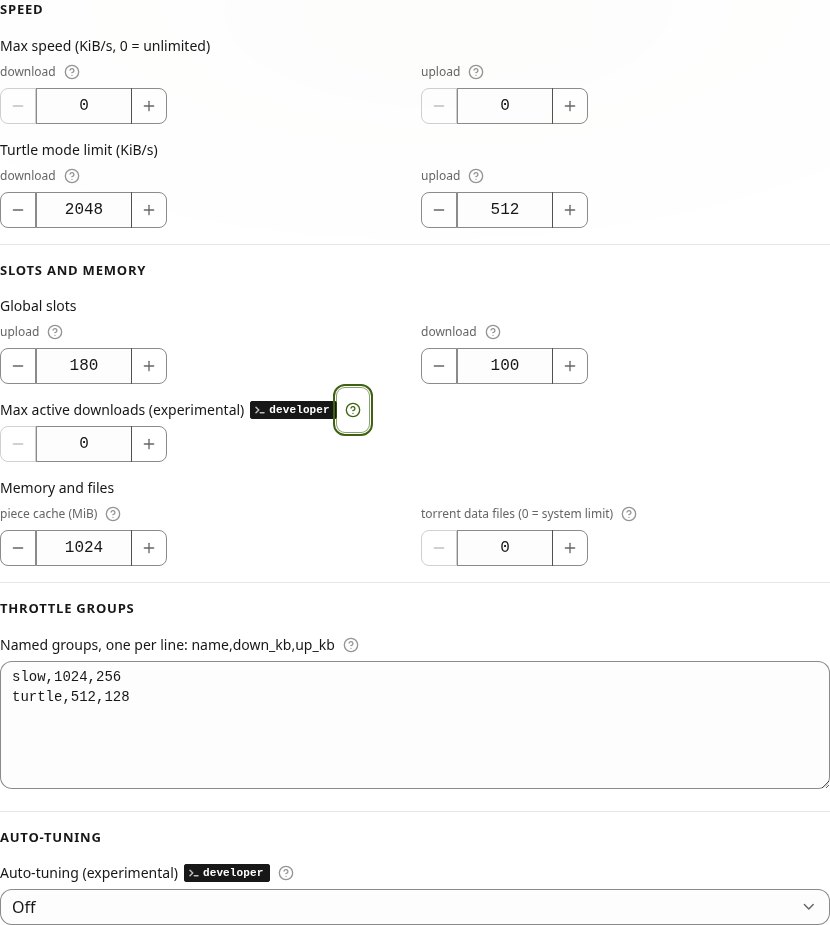
Settings: Auto-tuning and Max active downloads (both experimental, Developer mode only) are marked Not recommended. Max active downloads says why under the field: a few slow torrents can hold up the rest.
Minor
Auto-tuning: no more peers or slots for any torrent while the disk or the link limits a download, and it no longer interrupts a download test. A torrent stopped while held at one download slot gets its slots back.
Settings → Bandwidth & limits: Max active downloads is now experimental and shows only in Developer mode (Settings → Advanced), marked developer. With Developer mode off no download waits as Queued, and downloads that were waiting start at once. The number you saved stays.
Minor
Guides: Torrents (Queued) and Auto-tuning say the queue works only in Developer mode.
Settings → Bandwidth & limits: Max active downloads (formerly Max simultaneously active torrents) counts downloads only. Downloads over that number wait as Queued and start by themselves when a download finishes, stops or is removed, or at once when you raise the number. Seeding torrents are not counted and never wait. 0 means no limit, and the number you saved stays.
Auto-tuning (experimental, Developer mode only): while torrents download, it checks every 10 seconds what holds them back: the disk, the link, rtorrent's processor thread or the peers. When the disk is the limit and two or more torrents download, it changes the download slots of one torrent at a time and takes the change back at once if the download gets slower. The fastest torrent keeps its slots. This part sets only the download slots of single torrents, never your settings. The Auto-tuning card shows the current limit in one line.
Minor
Guides: Auto-tuning has a new part, While a download runs, and Torrents explains Queued.
IRC page: Reset the login sets one new password for the bouncer and the web client together. Until now it changed only the bouncer's password, and the web client could no longer reach the bouncer. The new password is in first-run.txt and in the System Logs; sign in to the web client again with it. This needs the IRC add-on 0.10.1-11 from App Center. With an older add-on, the button asks you to update it.
Minor
Seeding & Retention: two help texts said seed torrents are skipped. The seeding rules and Storage protection cover seed and upload torrents too, and the texts now name what they leave alone.
Network & NAT: the router mapping step sends you to step 4, the check from the internet, which tells whether the port is open.
Guides: Media library (the seed and upload labels, films in archives) and Torrents (the notification when a torrent leaves seed) corrected.
Auto-tuning (experimental, Developer mode only): a peer cut made for a busy disk is checked against the bytes downloaded and taken back when the download fell by more than 5 %, so it no longer repeats every few minutes. The private download slots move with the private max peers. In Settings, each field auto-tuning holds has an Auto-tune badge and shows its value beside yours.