Podążaj za instrukcjami w poniższym filmie, aby zobaczyć, jak zainstalować naszą stronę jako aplikację internetową na ekranie głównym swojego urządzenia.
Informacja: Ta funkcja może nie być dostępna w niektórych przeglądarkach.
Używasz przestarzałej przeglądarki. Może ona nie wyświetlać poprawnie tej lub innych stron internetowych. Powinieneś zaktualizować swoją przeglądarkę lub użyć alternatywnej przeglądarki.
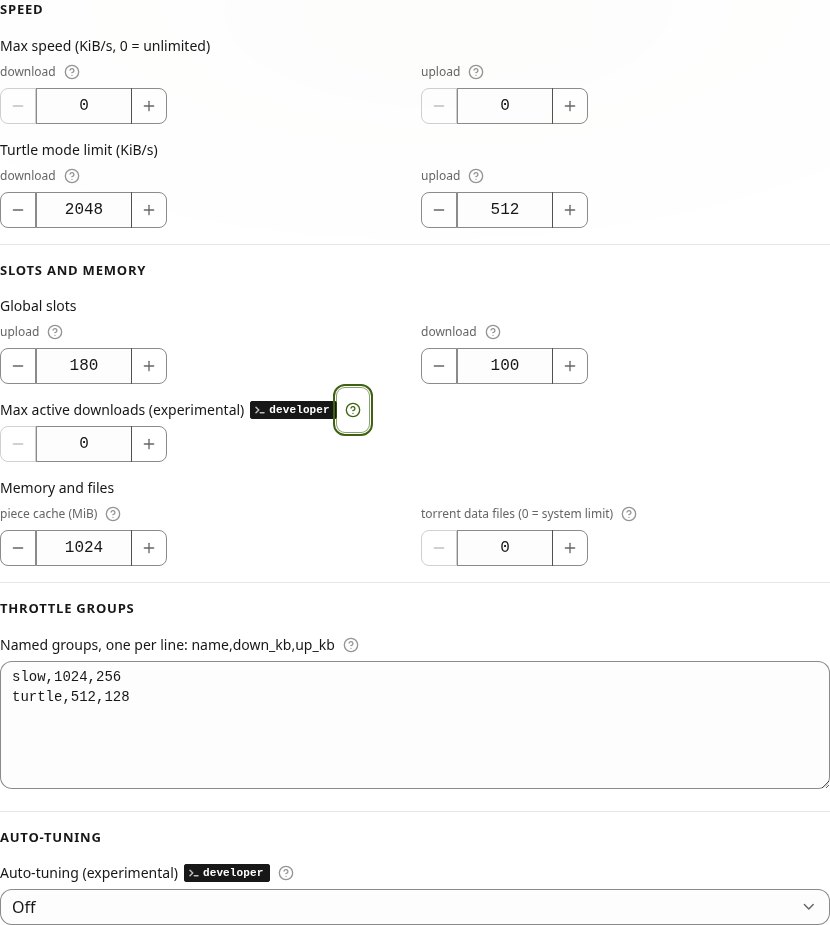
Settings: Auto-tuning and Max active downloads (both experimental, Developer mode only) are marked Not recommended. Max active downloads says why under the field: a few slow torrents can hold up the rest.
Minor
Auto-tuning: no more peers or slots for any torrent while the disk or the link limits a download, and it no longer interrupts a download test. A torrent stopped while held at one download slot gets its slots back.
Settings → Bandwidth & limits: Max active downloads is now experimental and shows only in Developer mode (Settings → Advanced), marked developer. With Developer mode off no download waits as Queued, and downloads that were waiting start at once. The number you saved stays.
Minor
Guides: Torrents (Queued) and Auto-tuning say the queue works only in Developer mode.
Settings → Bandwidth & limits: Max active downloads (formerly Max simultaneously active torrents) counts downloads only. Downloads over that number wait as Queued and start by themselves when a download finishes, stops or is removed, or at once when you raise the number. Seeding torrents are not counted and never wait. 0 means no limit, and the number you saved stays.
Auto-tuning (experimental, Developer mode only): while torrents download, it checks every 10 seconds what holds them back: the disk, the link, rtorrent's processor thread or the peers. When the disk is the limit and two or more torrents download, it changes the download slots of one torrent at a time and takes the change back at once if the download gets slower. The fastest torrent keeps its slots. This part sets only the download slots of single torrents, never your settings. The Auto-tuning card shows the current limit in one line.
Minor
Guides: Auto-tuning has a new part, While a download runs, and Torrents explains Queued.
IRC page: Reset the login sets one new password for the bouncer and the web client together. Until now it changed only the bouncer's password, and the web client could no longer reach the bouncer. The new password is in first-run.txt and in the System Logs; sign in to the web client again with it. This needs the IRC add-on 0.10.1-11 from App Center. With an older add-on, the button asks you to update it.
Minor
Seeding & Retention: two help texts said seed torrents are skipped. The seeding rules and Storage protection cover seed and upload torrents too, and the texts now name what they leave alone.
Network & NAT: the router mapping step sends you to step 4, the check from the internet, which tells whether the port is open.
Guides: Media library (the seed and upload labels, films in archives) and Torrents (the notification when a torrent leaves seed) corrected.
Auto-tuning (experimental, Developer mode only): a peer cut made for a busy disk is checked against the bytes downloaded and taken back when the download fell by more than 5 %, so it no longer repeats every few minutes. The private download slots move with the private max peers. In Settings, each field auto-tuning holds has an Auto-tune badge and shows its value beside yours.
Settings → Connection profiles → Peer rules: three switches with their numbers. You can switch off or tune how a download closes peers that keep it waiting, how it closes them sooner while it is stuck, and the download slot rotation. A change takes effect at once, without restarting rtorrent. The defaults are the numbers Rtorrent 16 used until now.
Each of the twelve numbers is also an rtorrent command, for example throttle.idle_peers.timeout.set = 600. Your own line in rtorrent.rc wins at start, and the field then shows the value rtorrent runs with. The Tracker kinds guide lists the commands.
New guide, Questions and answers: 21 questions users asked about ports behind a router or a VPN, seeding, the media library, speeds, add-on passwords, LinkDrop and the phone app. In English and Polish.
Guides: corrected text about an add-on's first password, logins after a reinstall, and saved port ranges.
Downloads: when all of a torrent's download slots are in use and more peers are ready to send, every 30 seconds the slowest peers give their slots to the ones that wait, so a fast seedbox that comes late still gets its turn. Thanks to NA9D for the question.
Private torrents download from as many peers at once as their peer maximum: 100, 150 or 225 on the 1, 2.5 and 10 Gbps link profiles (was 15, 25 or 50). The update moves the old numbers to the new ones and writes one line about it in the QNAP System Logs; a number you set yourself stays.
Minor
Network & NAT: routers inside your internet provider's network are no longer shown as a second router of yours, and the route card agrees with the port test.
Files: the folder path stays on one line on a phone, without flicker. Tap … or press Ctrl+L to open Jump to… and type a path.
Files › Subtitles…: OpenSubtitles.com works now (16.27-10Y shipped without its key). The package has two keys and uses them in turn; when OpenSubtitles makes one key wait or refuses it, Files asks with the other.
Files › Subtitles…: when the day's OpenSubtitles downloads are used up, the window says so and gives the UTC time when more are allowed.
Minor
Phone app: the panel offers the Android app 1.2.4. It has newer AndroidX libraries and works as 1.2.3 did.
Downloads: a downloading torrent closes the peers that keep it waiting (after 5 minutes, or 90 seconds once the download has almost stopped), so it can find peers that send. Thanks to NA9D for the report and screenshots. The same change is offered to libtorrent: rakshasa/libtorrent#1041.
Media library: History is now Scrapers History, one list of what Movie Agent, FileBot and Game Agent did, with small Re-identify, Edit name, Re-run and Undo buttons.
Minor
Files › Subtitles…: NapiProjekt is asked at most once every 11 seconds, and each source gets one line under the results (what it found, nothing found, or why it refused).
Media library: on a phone, a Scrapers History row takes three short lines.
Trackers: the private tracker account uses the tracker's new API (v3) before the old one is retired at the end of 30 November. Saved accounts move by themselves.
Search: that tracker's results come page by page, with Load more under the list.
Minor
Media library: the Library card's covers start in One row. A device where you chose Grid keeps Grid.
LinkDrop: when a browser finds no direct path to the sender, the link page says what to try within 20 seconds: a different network, like Wi-Fi instead of mobile data, or Rtorrent 16 on a NAS (Files › Download from link…).
Minor
LinkDrop: a browser that opened the link over IPv6 can now connect over IPv6 too.
LinkDrop: the agent's log counts the connection checks of a browser connection that failed.